
PK365 Login
PK365 login gives registered users access to their PK365 game account. From the login screen, users can enter their registered phone number, email, or profile information and then sign in with their password or an available login code. This guide explains where to find the login option, how the login form works, and what to do if you have trouble accessing your account.
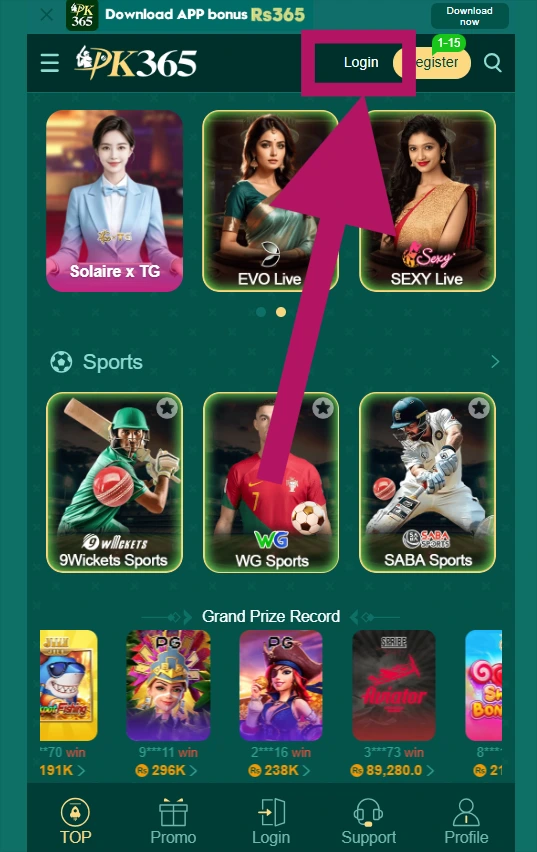
Where to Find the PK365 Login Button
- Open the PK365 website using the official URL.
- Look at the top navigation area of the homepage, this is typically where account-related options are located.
- Select “Login,” which is usually positioned next to the “Register” option in the upper navigation bar.
- The login screen will open, displaying the fields needed to sign in.
- Enter your registered account information (such as your phone number, email, or username) along with your password to access your account.
What the PK365 Login Page Looks Like
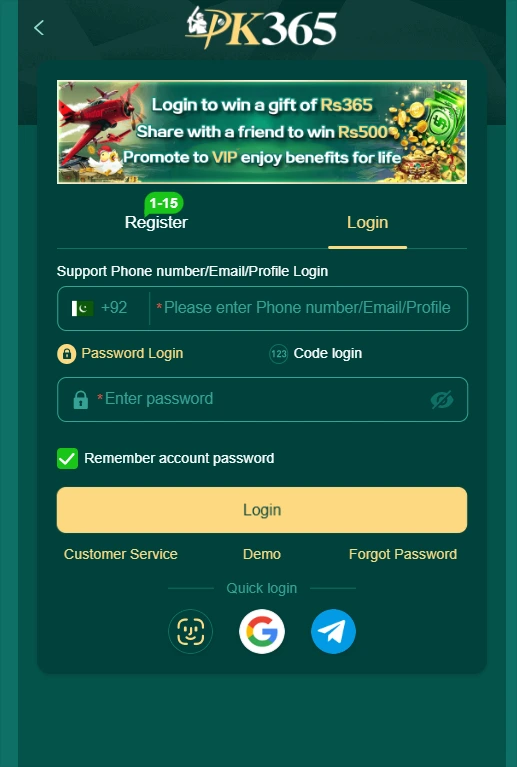
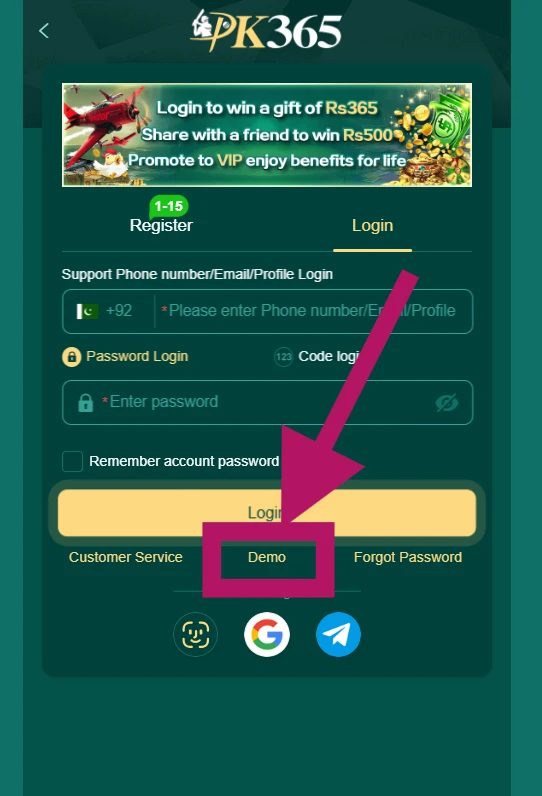
The PK365 login page is designed to be simple and quick to use. Here’s a breakdown of what you’ll typically see on the screen:
- PK365 branding the logo and site name displayed at the top, confirming you’re on the platform’s login screen.
- Register and Login tabs toggle options letting users switch between creating a new account and signing into an existing one.
- Account identification field where you enter your registered phone number, email, or account identifier to begin logging in.
- Pakistan
+92country code a preset or selectable country code shown alongside the phone number field for users registering or logging in with a Pakistani mobile number. - Password Login the standard sign-in method, where you enter your account identifier and password.
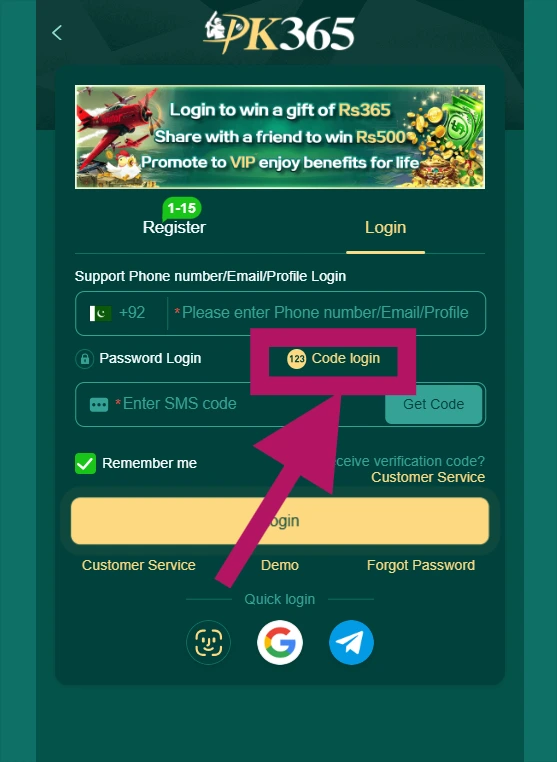
- Code Login an alternative sign-in method using a one-time code sent to your registered phone or email instead of a password.
- Password field where you type in your account password when using Password Login.
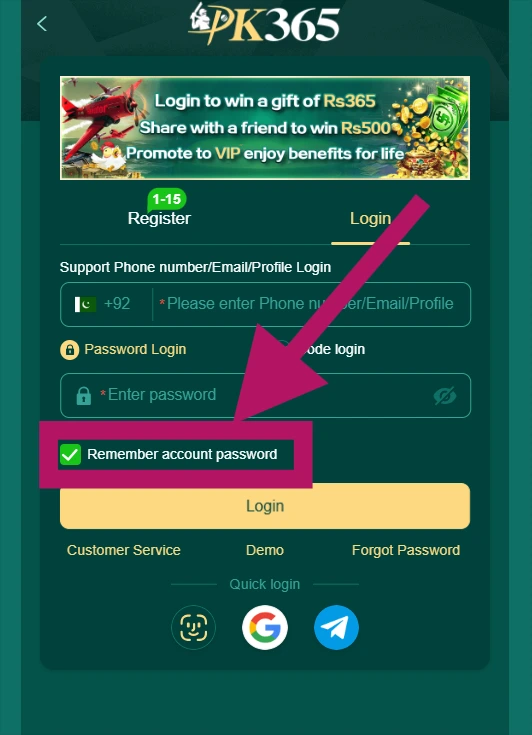
- Remember account/password option a checkbox allowing the site to save your login details on that device for faster future sign-ins (best used only on personal, non-shared devices).
- Login button submits your credentials to access your account.
- Customer Service a link or icon for reaching PK365 support if you need help.
- Demo an option that may allow users to try a demo or preview version of the platform before or without logging in.
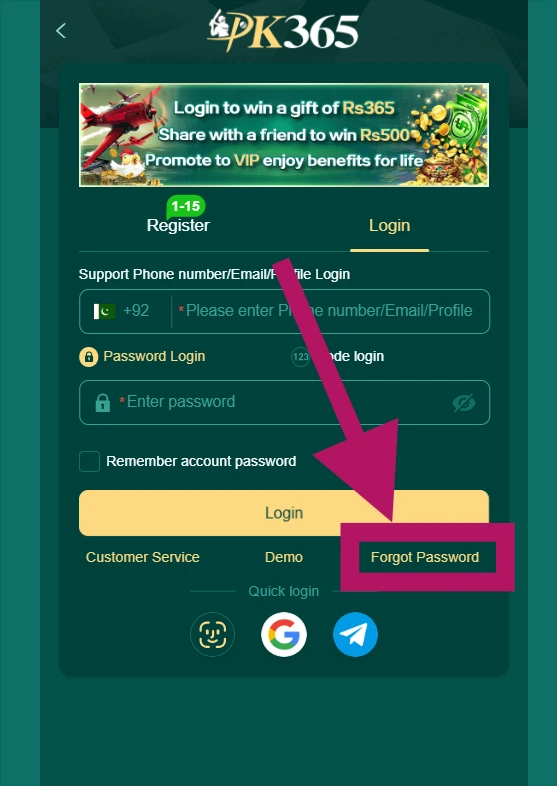
- Forgot Password a link to begin the password recovery process if you can’t remember your password.
- Quick login icons shortcut options that may allow signing in through linked third-party accounts or saved methods.
PK365 Login Requirements
Before attempting to sign in, users generally need the following.
Registered PK365 Account
An existing, registered PK365 account is required to log in. If you haven’t created one yet, you’ll need to complete registration first before you can use the login screen. if you want to register click here.
Registered Login Information
Based on the login screen, the account identification field may accept:
- Phone number
- Profile information
The exact options available can vary depending on how the platform’s login system is configured at any given time, so users should refer to the fields currently shown on the login page.
Account Password or Login Code
The login screen offers two sign-in methods: Password Login, where you enter your account password, and Code Login, where you sign in using a one-time code instead. Users can choose whichever option is available and most convenient for them.
Internet Connection
A stable internet connection is needed to load the login page and successfully communicate with the service while signing in.
How to Login to PK365
Step 1 – Open the PK365 Website
Access the website you normally use for your PK365 account, making sure it’s the official site.
Step 2 – Select Login
Click the Login button in the top navigation.
Step 3 – Enter Your Account Information
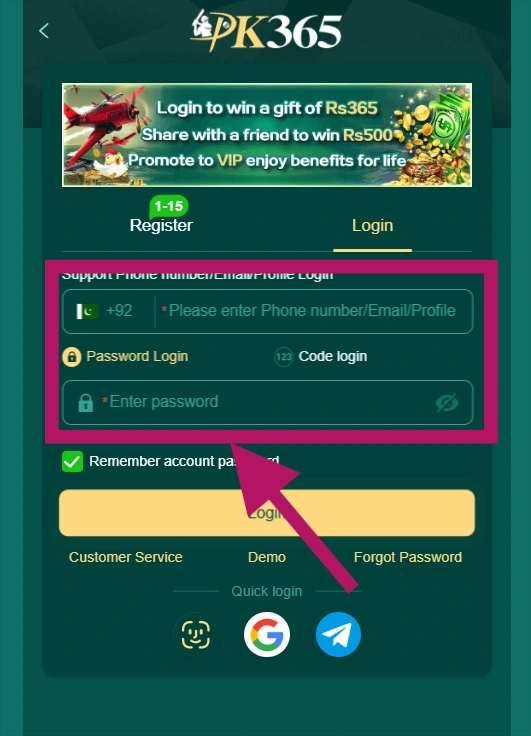
In the account identification field, enter the information associated with your account, which may include:
- Phone number
- Profile/account information
Step 4 – Select Password Login
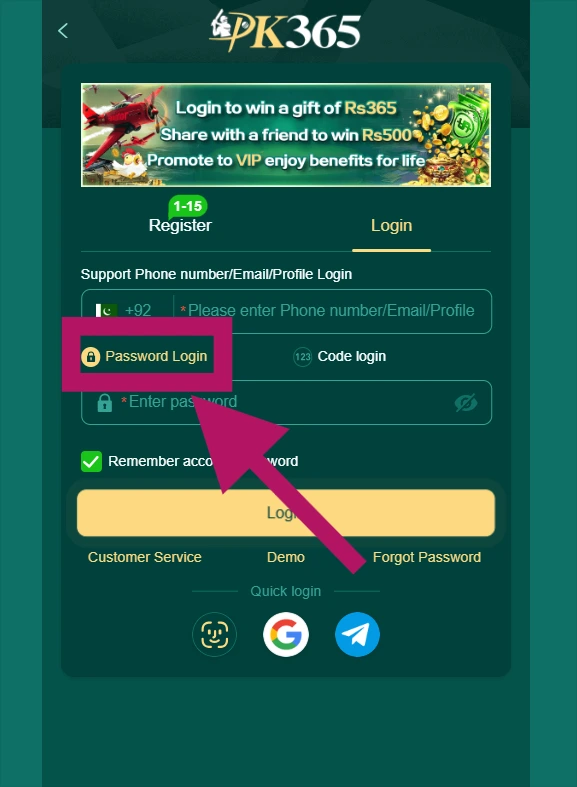
If you want to sign in using your password, select the Password Login option.
Step 5 – Enter Your Password
Type in the password associated with your account.
Step 6 – Select Login
After reviewing the information you’ve entered, click the Login button to submit it.
Step 7 – Access Your Account
If your credentials are correct and your account is active, you’ll be able to proceed to your account’s available features.
PK365 Password Login
Password Login is one of the sign-in methods available on the PK365 login screen, letting you access your account using your registered credentials and password.
To sign in with Password Login:
- Select Password Login on the login screen.
- Enter the registered account information, such as your phone number, email, or profile information, into the account identification field.
- Enter the account password associated with your account.
- Check the information you’ve entered to make sure it’s accurate before submitting.
- Select Login to access your account.
Important Security Note: This guide will never ask you to enter or share your password on this website. Passwords should only ever be entered directly on PK365’s official login page, never on a third-party site, guide, or form.
PK365 Code Login
The PK365 login screen may provide a Code Login option alongside Password Login. If you choose Code Login, follow the verification instructions displayed by the PK365 login system to complete the sign-in process.
Password Login vs Code Login
| Login Option | Purpose |
|---|---|
| Password Login | Sign in using account credentials and password |
| Code Login | Use the login-code method offered on the login screen |
Remember Account Password Option
The login page includes a “Remember account password” option. Users should consider their device and privacy before enabling this setting, particularly when using a shared or public computer.
Security Recommendation
For shared devices:
- Leave the option disabled
- Log out after use
Forgot PK365 Password?
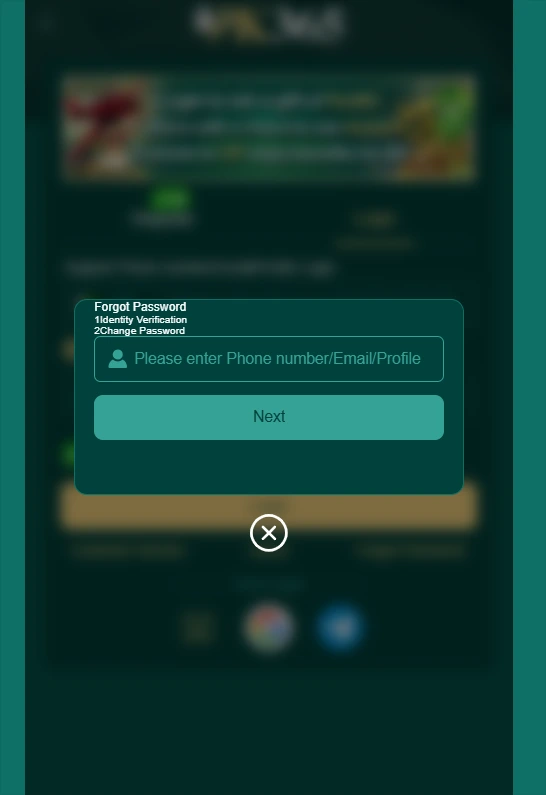
If you can’t remember your password, PK365 provides a recovery option directly on the login screen.
- Open the PK365 login page.
- Select “Forgot Password.”
- Enter the information requested by the platform to identify your account.
- Complete any verification steps shown by the system.
- Create a new password, if prompted to do so.
- Return to the login screen.
- Sign in with your updated credentials.
PK365 Login on Mobile
Users can access the PK365 login interface from a compatible mobile browser, making it easy to sign in on the go.
How to Login on a Mobile Phone
- Open the PK365 website in your mobile browser.
- Locate the Login option.
- Enter your registered account information.
- Choose the available login method.
- Enter the required credentials.
- Tap Login.
Mobile Login Tips
- Keep your browser updated.
- Check your internet connection.
- Make sure your login details are correct.
- Avoid using suspicious websites.
- Don’t share your password with anyone.
PK365 Login Problems and Solutions
PK365 Login Details Are Incorrect
If your login isn’t going through, double-check the following:
- Phone number
- Profile/account information
- Password
- Selected login method
Forgot Password
Use the Forgot Password option displayed on the login page to reset your credentials.
Login Page Is Not Loading
If the login page won’t load, try:
- Refreshing the page
- Checking your internet connection
- Clearing your browser cache
- Opening the page in another browser
- Checking whether the service is temporarily unavailable
Login Button Does Not Work
Check whether all required fields have been completed correctly before trying again.
Code Login Is Not Working
Follow the instructions displayed by the current login interface, and request another code if the platform provides that option.
Account Access Is Restricted
If the login system indicates that your account is restricted or unavailable, contact the platform’s official customer-support channel for assistance.
PK365 Customer Service
If standard login troubleshooting does not resolve the problem, users can look for the Customer Service option provided by PK365 and follow the available support instructions to get further help.
Important: No specific contact details (phone numbers, Telegram/WhatsApp accounts, email addresses, etc.) are included here, since these should only be published once verified directly from the official PK365 platform. Unverified contact information could mislead users or, worse, direct them toward scam accounts impersonating support, so I’d recommend pulling these details straight from the official site before adding them.
PK365 Demo Login
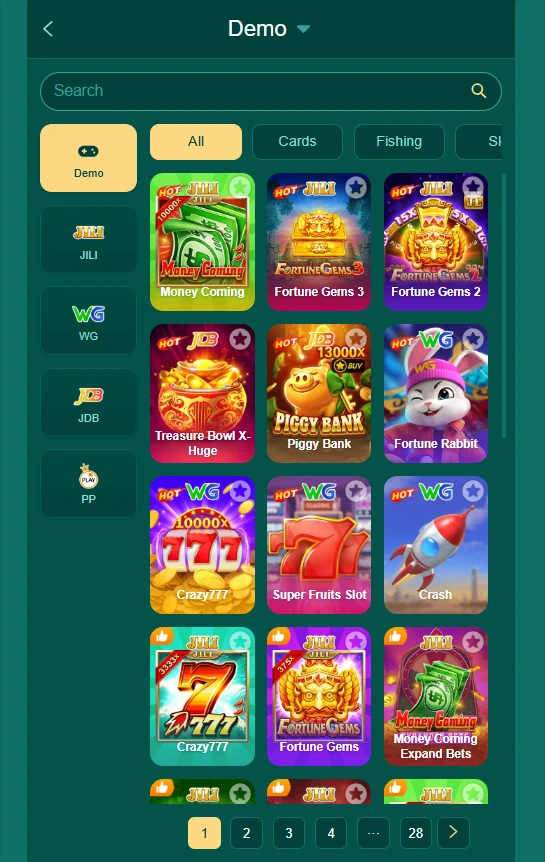
The PK365 login screen includes a Demo option, located near Customer Service and Forgot Password. Selecting Demo allows users to explore the platform without creating an account or logging in.
Once selected, the Demo option opens a preview of the game lobby, where users can browse available game categories (such as Cards, Fishing, and Slots) and see game providers like JILI, WG, JDB, and PP, along with individual game tiles.
This gives new users a way to see what PK365 offers before deciding to register for a full account.
How to Access Demo Mode
- Open the PK365 login page.
- Select Demo, located below the Login button.
- Browse the available game categories and titles without signing in.
PK365 Quick Login
The login page may provide additional quick-login methods alongside the standard Password Login and Code Login options, offering users faster ways to sign in.
Available Quick Login Options
Based on the icons shown on the current interface, quick login options may include:
- A Google-related login option
- A Telegram-related login option
Note: These options are described based on what’s visible on the supplied screenshot. Availability may vary depending on the account, region, or platform updates, so this section shouldn’t claim these methods always work or are available to every user. I’d recommend confirming with the live platform exactly which quick-login providers are supported and whether any restrictions apply before publishing.
PK365 Login Security Tips
Keeping your account secure starts with how carefully you approach the login process. Recommended practices include:
- Use the correct PK365 website address.
- Check the domain before entering credentials.
- Never share your password.
- Don’t send your login code to another person.
- Avoid saving passwords on public computers.
- Log out from shared devices.
- Don’t follow suspicious login links.
- Keep your browser and device updated.
Avoid Fake PK365 Login Pages
Because many search users looking for a login page can encounter unofficial or misleading websites, it’s important to carefully verify the website address before entering any account information. Fake login pages are often designed to closely resemble the real site, so always double-check that you’re on the official PK365 domain, ideally by typing the address directly or using a trusted bookmark, rather than clicking links from ads, messages, or unfamiliar sources.
PK365 Login vs Registration
| Situation | Page to Use |
|---|---|
| Already have an account | PK365 Login |
| New user | PK365 Registration |
| Forgot password | Password Recovery |
| Login problem | Customer Service |
Looking for a new account? Read our PK365 Registration Guide.
What to Do After PK365 Login
Depending on the current platform interface, users may be able to access various account-related features after signing in. Common areas users might expect to find include:
- Profile
- Account settings
- Available games
- Game history
- Promotions
- Wallet
- Support
- Other account features
PK365 Login FAQs
Need Help With PK365 Login?
If you already have a PK365 account, use the login process described above and check your account details carefully. If you cannot access your account, use the password-recovery or customer-service options available on the current login page.