
PK365 Game Bonus
The PK365 Bonus section provides information about promotional offers and rewards available to eligible users. Depending on the current promotion, an offer may come with specific eligibility requirements, activation steps, expiry dates, or other conditions. This guide explains how to find PK365 bonuses, understand their requirements, and check the status of a bonus before using it. Bonus availability and terms can change at any time, so always check the current promotion page rather than relying on older information.
What Is the PK365 Bonus?
A gaming bonus is a promotional reward, such as extra credit, a percentage match, or another incentive, that a platform offers under specific conditions rather than as an automatic part of every account.
- Where to find bonus information: inside PK365’s Bonus or Promo section, accessible after logging in.
- How promotional offers may work: an offer is usually tied to an action (registering, depositing, inviting a friend, etc.) and becomes active once its conditions are met.
- Why users should read the conditions first: bonuses often carry eligibility rules, minimum amounts, turnover requirements, or expiry dates that determine whether the reward is actually usable.
- Why not every account gets the same promotion: offers can vary by account status, region, timing, or promotion type, so what one user sees may differ from another.

How to Access the PK365 Bonus Page
Step 1 – Open PK365
Go to the current official PK365 website or app.
Step 2 – Login to Your Account
Sign in, since most bonus information is tied to an individual account.
Step 3 – Open the Bonus or Promotion Section
From the bottom navigation bar, tap Promo. This opens a promotions area with its own set of tabs, including Event, Mission, VIP, Unclaimed, and History.

Step 4 – Review Available Offers
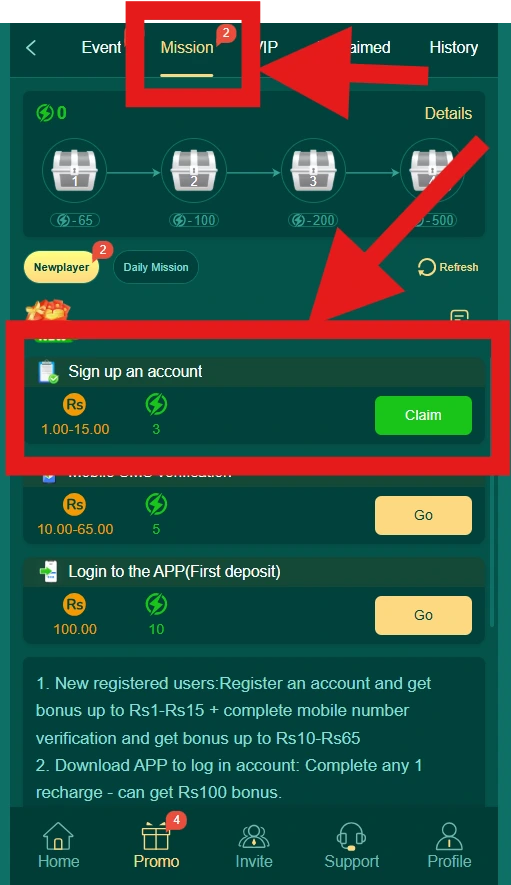
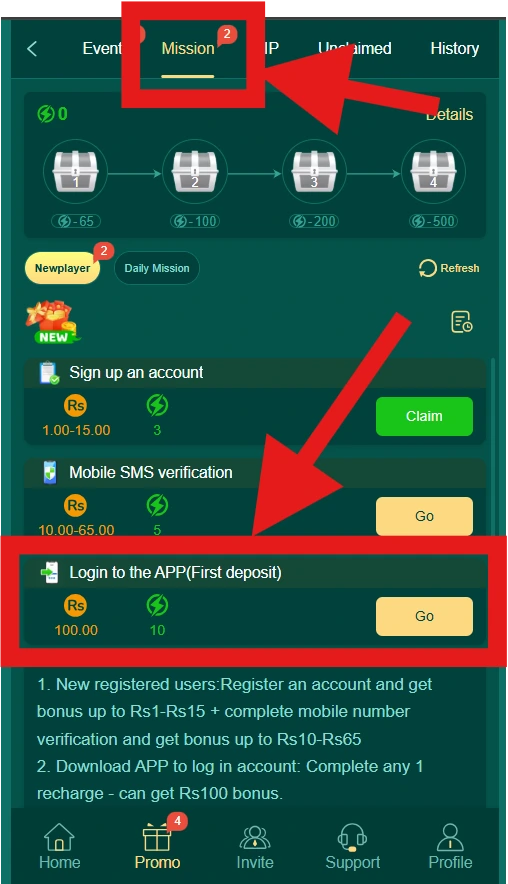
Under the Mission tab, you’ll see the currently active tasks and their rewards (for example, sign-up, verification, and first-deposit tasks, see below). Availability and amounts can change, so check this tab directly rather than relying on older figures.
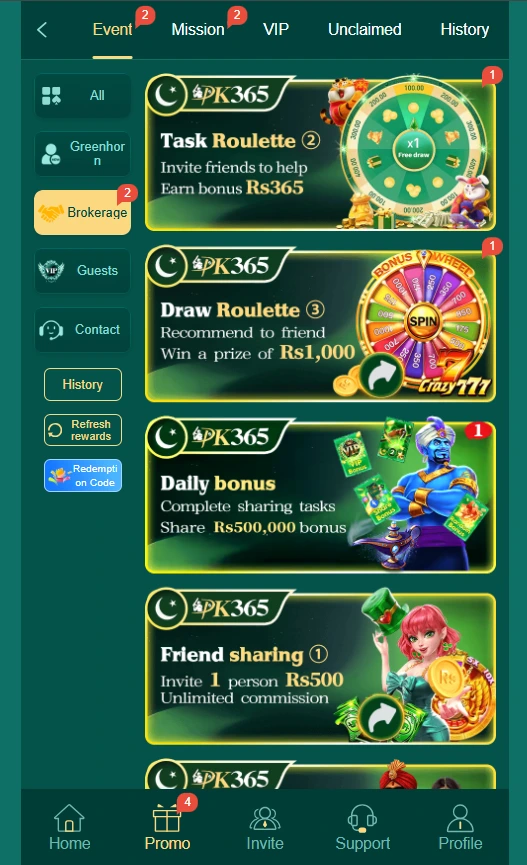
PK365 Bonus Offers
The Promo > Mission tab is where PK365’s confirmed account-activity bonuses currently live. As shown on the page, the active tasks are:
| Task | Reward | Notes |
|---|---|---|
| Sign up an account | Rs 1.00–15.00 | Claimed via a Claim button once registration is complete |
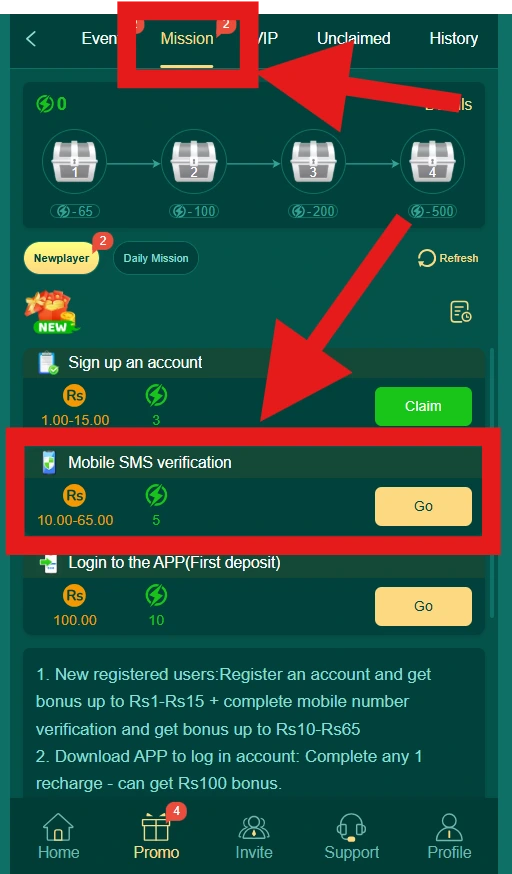
| Mobile SMS verification | Rs 10.00–65.00 | Claimed via a Go button after verifying your number |
| Login to the APP (First deposit) | Rs 100.00 | Claimed via a Go button; tied to completing a first deposit through the app |
The page’s own summary confirms the ranges: new registered users get a bonus up to Rs 1–15 for registering, plus a bonus up to Rs 10–65 for completing mobile number verification; downloading the app and completing one recharge (deposit) can get a Rs 100 bonus.
Beyond these Mission tasks, PK365 also currently shows:
- A VIP Privilege Club promotion (see below)
- Referral / friend-sharing rewards and agent commission, covered in our PK365 Referral Guide
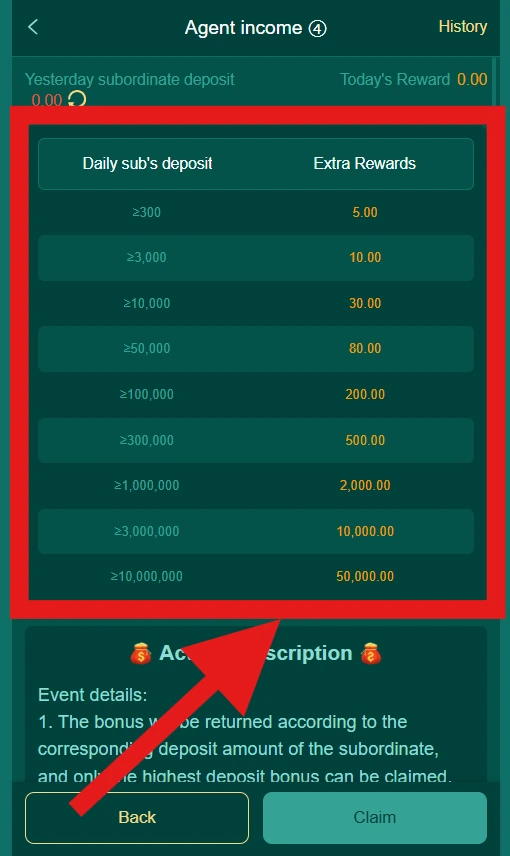
Don’t assume PK365 offers categories beyond what’s listed here, this reflects what’s currently shown on the Promo and Invite pages.
PK365 Sign-Up, Verification & First-Deposit Bonuses
These three tasks sit together under Promo > Mission and are the most direct way new users encounter a bonus.
Sign Up an Account
- Reward: Rs 1.00–15.00
- How to claim: Register an account, then tap Claim on the “Sign up an account” task once it’s marked eligible.
Mobile SMS Verification
- Reward: Rs 10.00–65.00
- How to claim: Complete mobile number verification, then tap Go on the “Mobile SMS verification” task to claim.
Login to the APP (First Deposit)
- Reward: Rs 100.00 (fixed)
- How to claim: Download and log in to the PK365 app, complete one recharge (deposit), then tap Go on the “Login to the APP (First deposit)” task.
Where to Check These
All three appear under the Mission tab inside Promo, alongside a “Newplayer” and “Daily Mission” filter, and a running energy-point counter used for a separate chest/reward-tier feature on the same page.
PK365 VIP Privilege Club Bonus
PK365 also promotes a VIP Privilege Club, shown via an in-app popup, with the following tiers:
| Reward | Amount |
|---|---|
| Promotion bonus | Rs 10,000,000 |
| Daily Bonus | Rs 500,000 |
| Weekly Bonus | Rs 2,000,000 |
| Monthly Bonus | Rs 5,000,000 |
According to the popup, monthly VIP rewards are claimed on the 1st of each month using the latest app version, higher VIP levels unlock higher reward amounts, and the maximum reward is stated as up to Rs 10,000,000. Since this is a promotional popup rather than a fixed guarantee, treat the figures as the current advertised tiers and confirm your own eligibility and VIP level inside your account before expecting a specific payout.
PK365 Deposit Bonus
How the Deposit Bonus Works
The clearest confirmed deposit-linked reward is the Login to the APP (First deposit) task under Promo > Mission, which pays a fixed Rs 100.00 once you complete one recharge through the app after logging in. Beyond that specific task, PK365’s Promo/Event area may run additional percentage-based deposit promotions from time to time, check the Event tab for anything currently active, since none were confirmed in the screenshots reviewed here.
Deposit Bonus Requirements
For the confirmed first-deposit task: log in to the app and complete one recharge. For any other deposit promotion shown under Event, follow that offer’s own stated requirements.
Deposit Bonus Limits
The first-deposit Mission reward is a fixed Rs 100 rather than a percentage, don’t assume it scales with your deposit size. Any other deposit promotion’s minimum/maximum should be read directly from its own terms.
Deposit Bonus Terms
Check the specific promotion for any turnover, eligible-game, or time restrictions before assuming a deposit-linked reward is unrestricted.
PK365 Referral Bonus
For the full breakdown of how PK365’s referral link, invitation code, QR code, milestone rewards, and agent commission work, see our PK365 Referral Guide. In short, referral-related rewards depend on:
- Sharing a valid referral link, invitation code, or QR code
- A new user registering through that link/code
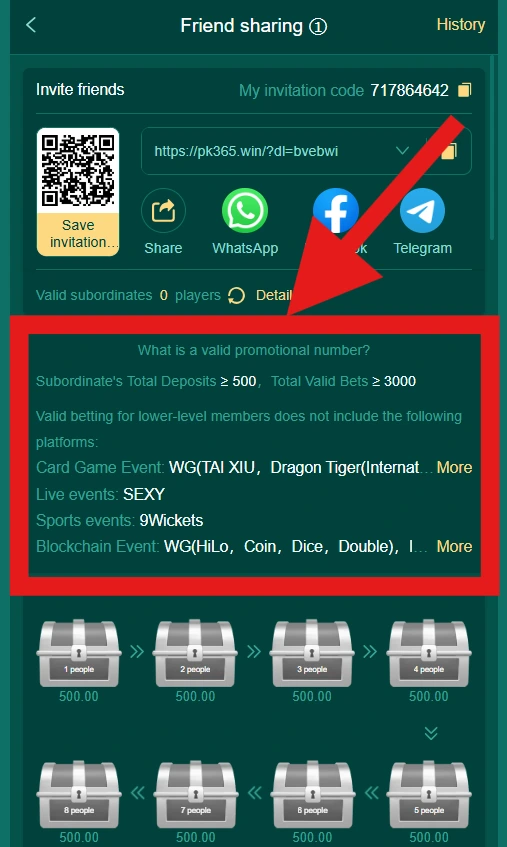
- The referral meeting the “valid promotional number” thresholds (Total Deposits ≥ 500, Total Valid Bets ≥ 3,000)
- Reward tracking through the Invite section’s Performance and Commission tabs
- Current reward status as shown in your account
PK365 Bonus Code
What Is a PK365 Bonus Code?
If supported, a bonus code is a promotional code entered to activate a specific offer.
Where to Enter the PK365 Bonus Code
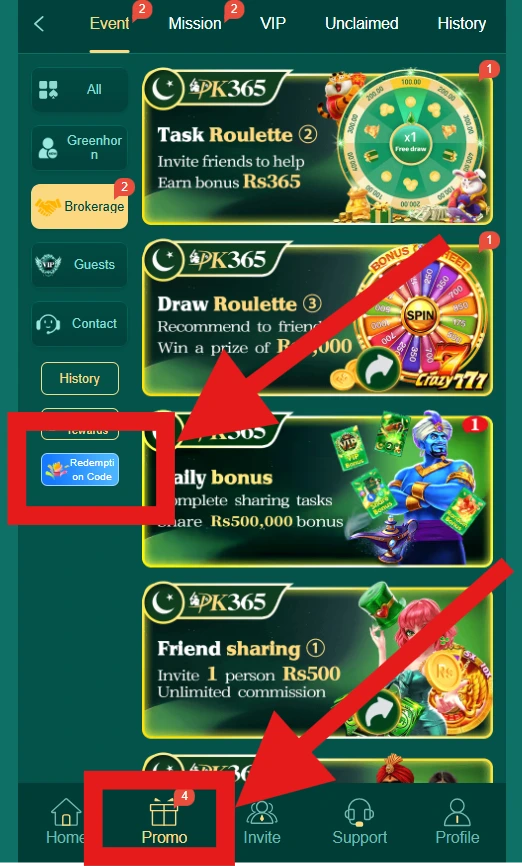
Check the Bonus/Promo section for a code-entry field; not all promotions require or accept a code.
How to Use a PK365 Bonus Code
- Find an eligible promotion that specifies a code.
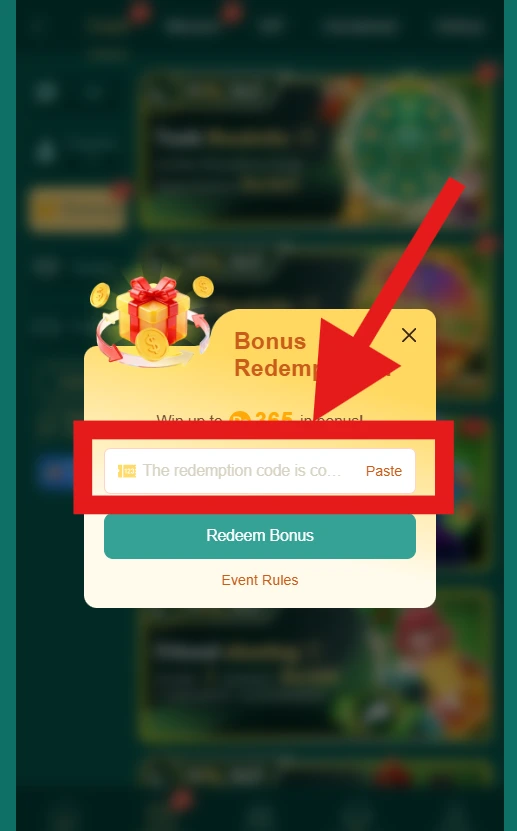
- Copy the correct code exactly.
- Open the relevant bonus/promotion area.
- Enter the code in the provided field.
- Confirm the promotion.
- Check whether the bonus was activated in your account.
PK365 Bonus Code Not Working
Common reasons include:
- The code was typed incorrectly
- The promotion has expired
- Your account isn’t eligible for that specific offer
- The code has already been used
- A minimum requirement (such as a deposit amount) wasn’t met
- The promotion is no longer available
How to Claim a PK365 Bonus
Step 1 – Login
Access your PK365 account.
Step 2 – Open Bonuses or Promotions
Navigate to the Bonus/Promo section.
Step 3 – Select an Eligible Offer
Read through the details of the promotion before proceeding.
Step 4 – Check the Requirements
Review eligibility, minimum qualifying amount, expiration, turnover requirements, game restrictions, and any other stated conditions.
Step 5 – Activate or Claim the Bonus
Use the claim/activate button if the offer requires one; some bonuses may apply automatically once conditions are met.
Step 6 – Check Bonus Status
Confirm in your account whether the promotion is now active, pending, or otherwise reflects the expected status.
PK365 Bonus Requirements
Depending on the offer, requirements can include:
- Account eligibility
- Registration completion
- A qualifying deposit
- A minimum qualifying amount
- A maximum reward cap
- Turnover (wagering) requirements
- Eligible games the bonus applies to
- Time limits for use
- Any account-level restrictions
Only apply the requirements actually listed for the specific promotion you’re viewing, don’t assume all bonuses share the same rules.
PK365 Bonus Turnover Requirements
What Is a Turnover Requirement?
A turnover (or wagering) requirement is a condition where qualifying activity must reach a certain multiple of the bonus (or deposit) amount before funds tied to the bonus become fully usable or withdrawable.
How Turnover Is Calculated
This depends entirely on what the specific promotion states, for example, a stated multiplier applied to the bonus amount, qualifying deposit, or both. Check the individual offer’s terms rather than assuming a standard formula applies across all PK365 promotions.
When Is a Bonus Requirement Completed?
If the platform provides progress tracking (for example, in the Bonus/Promo section or account activity history), check there. Otherwise, refer to the promotion’s terms for how completion is confirmed.
PK365 Bonus Expiry
Promotions commonly have a validity period. Relevant details to check on the offer itself include:
- Activation date
- Expiry date
- Remaining time, if displayed
- What happens once the bonus expires (for example, whether unused amounts are removed)
- Whether an expired bonus can be restored, which is not guaranteed unless the platform states otherwise
PK365 Bonus Withdrawal Rules
Bonus funds are often treated differently from a regular account balance:
- A bonus may require qualifying activity (such as meeting a turnover requirement) before it becomes withdrawable.
- Some promotions may restrict withdrawal entirely until conditions are met.
- Always check the individual promotion’s terms rather than assuming bonus funds behave like a normal deposit.
Can PK365 Bonus Be Withdrawn?
This depends on the specific bonus’s terms, there’s no single answer that applies to every promotion, so check the offer directly.
PK365 Bonus Status
If the platform displays a status label for promotions, it may include something like:
- Available
- Active
- Pending
- Completed
- Expired
- Cancelled
Only rely on the statuses actually shown in your account’s interface.
How to Check Bonus Status
Open the Bonus/Promo section and select the relevant offer to view its current status.
PK365 Bonus Not Received
Possible reasons:
- The promotion wasn’t activated
- Eligibility requirements weren’t met
- The qualifying transaction wasn’t completed
- The bonus is still processing
- The offer has expired
- An incorrect bonus code was used
- The account isn’t eligible for that specific promotion
- The promotion’s terms changed
What to do:
- Open the Bonus/Promotion section.
- Check the promotion’s current status.
- Review its terms carefully.
- Confirm that all required conditions were completed.
- Keep relevant transaction information on hand.
- Contact official PK365 support if the issue isn’t resolved.
PK365 Bonus Code Not Working
Common issues include a typing error, an expired code, a code that’s already been used, account ineligibility, a promotion that has ended, or an unmet minimum requirement. Avoid using bonus codes found on unofficial third-party sites, since these aren’t verified by PK365.
PK365 Bonus Expired
If an offer has expired, check:
- The stated expiration date
- Whether the bonus can be reactivated (not guaranteed)
- Whether a different current promotion is available instead
- Official support, if the expiration seems incorrect
PK365 Bonus on Mobile
How to Find PK365 Bonuses on Mobile
- Open PK365 on your phone’s browser.
- Log in.
- Open the account or promotions section.
- Select an available bonus.
- Read its conditions.
- Activate the promotion if you’re eligible.
- Check its status afterward.
PK365 Bonus Terms and Conditions
Reading the terms before accepting an offer helps avoid surprises. Terms typically cover:
- Eligibility
- Promotion period
- Minimum requirements
- Maximum bonus
- Turnover requirements
- Eligible games
- Expiration
- Withdrawal conditions
- Account restrictions
- Cancellation conditions
How to Choose a PK365 Bonus
Rather than assuming one bonus is simply “the best,” compare offers using the same criteria:
| Factor | What to Check |
|---|---|
| Bonus amount | Actual reward offered |
| Minimum requirement | Required qualifying amount |
| Maximum bonus | Maximum promotional value |
| Turnover | Required qualifying activity |
| Expiry | How long the promotion remains valid |
| Eligible games | Which activities qualify |
| Withdrawal rules | Conditions for withdrawing funds |
| Restrictions | Account or promotion limitations |
PK365 Bonus Security
- Only use the legitimate, official PK365 website or app.
- Read the promotion’s terms before accepting it.
- Never share your password.
- Never share login codes or OTPs.
- Don’t provide payment credentials to anyone claiming they can activate a bonus for you.
- Avoid unofficial bonus links shared outside PK365’s own platform.
- Be cautious of promotions advertised through unknown or unverified accounts.
Avoid Fake PK365 Bonus Offers
- Unrealistic bonus promises: be cautious of any offer that isn’t shown on the platform’s current promotion page.
- Fake bonus codes: don’t assume a code found on an unrelated website is legitimate just because it references PK365.
- Requests for account credentials: a real bonus never requires giving your password to another person.
- Unofficial payment requests: verify any unexpected payment demand through PK365’s official support before acting on it.
PK365 Bonus vs PK365 Referral
| PK365 Bonus | PK365 Referral |
|---|---|
| Promotional offers tied to account activity | Rewards tied to inviting other users |
| May be account-based (welcome, deposit, etc.) | Usually connected to referral links/codes |
| May require qualifying activity like turnover | May require qualifying referrals or activity |
| Terms vary by individual promotion | Terms depend on the referral/commission program |
For more detail on the referral side, see our PK365 Referral Guide.
PK365 Bonus vs Deposit Bonus
The general Bonus/Promo section can include multiple promotional categories (welcome offers, referral rewards, seasonal promotions, and more), while a deposit bonus specifically refers to a reward tied to a qualifying deposit. See our PK365 Deposit guide for more on the deposit process itself.
PK365 Customer Support for Bonus Problems
Contact official support if you experience issues such as:
- A bonus not being credited
- A promotion disappearing unexpectedly
- A bonus code being rejected
- An incorrect bonus amount
- A bonus marked expired unexpectedly
- Qualifying activity not being recorded
- Being unable to access a promotion you believe you’re eligible for
Information to have ready:
- Account information
- Promotion name
- Date and time
- Transaction ID, if applicable
- Any error message shown
- A screenshot of the relevant promotion
Never send your password or login codes to anyone, including someone claiming to be support, official support will not need these to help you.
Responsible Use of Bonuses
- Read the terms before accepting any promotion.
- Don’t deposit more than you can afford to lose just to qualify for a bonus.
- Avoid chasing losses.
- Understand that promotional rewards can come with conditions that affect when (or whether) they’re usable.
- Set personal spending limits for yourself.
- Take breaks from gaming regularly.
PK365 Bonus FAQs
PK365 Bonus: Final Tips
PK365 bonuses can have different eligibility requirements, activation procedures, expiry dates, and withdrawal conditions depending on the specific offer. Before accepting a promotion, read its current terms carefully and check whether you meet the requirements. Avoid relying on unofficial bonus codes or promotions found outside PK365’s own platform, and use official support if a bonus is missing or doesn’t work as expected.