
PK365 Referral
The PK365 Referral feature allows eligible users to invite other people through a referral link, QR code, or code provided by the platform. Depending on the current referral or commission program, users may be able to track their invitations, view commission earnings, and follow settlement cycles inside their account. This guide explains how the PK365 referral process works, how to find your referral information, and what to check before sharing an invitation. Referral earnings are not automatic for every invite, they depend on the requirements set by the current program.
What Is the PK365 Referral Program?
A referral program lets an existing PK365 user share a personal link, QR code, or account details with someone who does not yet have an account. When that person signs up through the shared link, the platform connects the new account to the referring user. From that point, the referring user may be able to track the invitation and, if the program’s conditions are met, receive a commission or reward.

- Who can participate: users who are logged into an active PK365 account.
- How an existing user invites another person: by sharing their referral link, QR code, or account link through the Invite section.
- How the invited user is connected: the new account is linked to the referrer once registration is completed through the shared link or code.
- When a referral may become eligible: this depends on the program’s settlement and qualification rules, which are shown inside the Invite section (for example, the settlement cycle).
- Where referral information can be viewed: inside the Invite page, under tabs such as Home, Promotion Sharing, My Data, Performance, and Commission.
How the PK365 Referral System Works
A simple overview of the flow:
PK365 user
↓
Opens Invite page
↓
Gets referral link / QR code
↓
Shares link, code, or QR
↓
New user registers through it
↓
Referral is recorded and linked to an Agent ID
↓
Required conditions/settlement cycle apply
↓
Eligible commission is credited
Registration alone does not necessarily guarantee a reward, the actual crediting of commission depends on the program’s ongoing rules, such as the settlement cycle and any qualifying activity requirements.
How to Access the PK365 Referral Page
Step 1 – Login to PK365
Sign in to your account from the homepage.
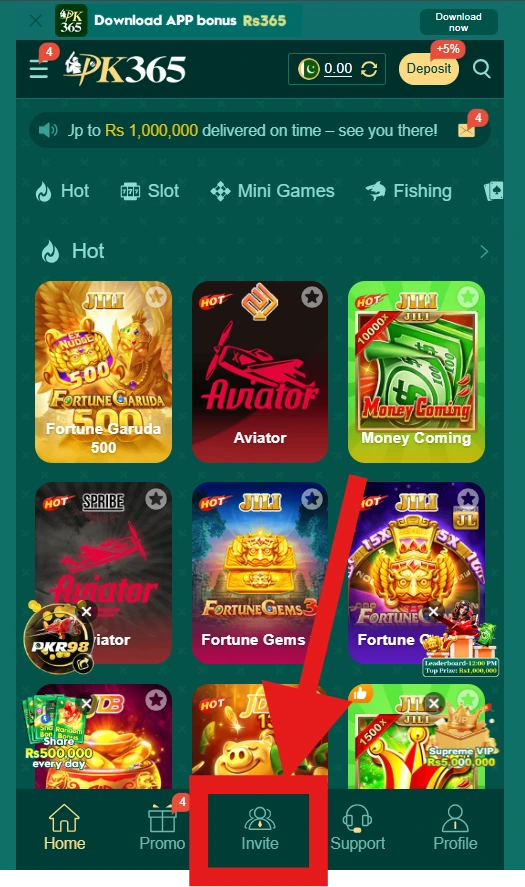
Step 2 – Go to the Bottom Navigation Bar
On the PK365 homepage, the bottom menu bar shows five options: Home, Promo, Invite, Support, and Profile.
Step 3 – Select Invite
Tap Invite in the bottom navigation bar to open the referral and commission section.
Step 4 – View Your Referral Information
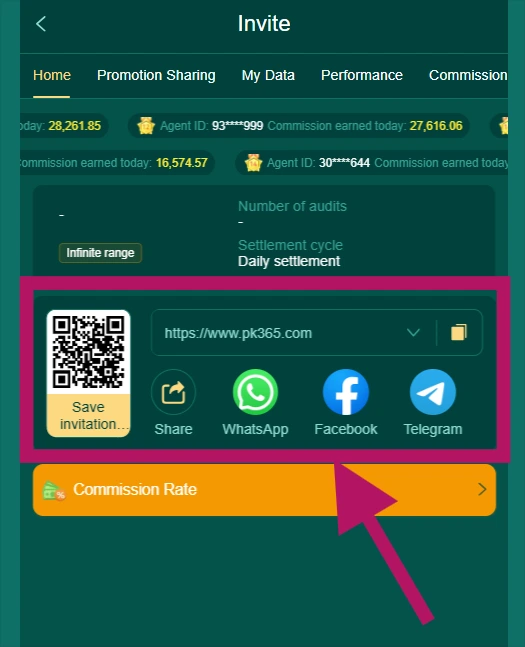
The Invite page opens on the Home tab by default, and includes additional tabs across the top: Home, Promotion Sharing, My Data, Performance, and Commission. The Home tab displays:
- Your Agent ID
- Commission earned today (and comparable figures for other agents/tiers shown on the page)
- Number of audits
- Settlement cycle (shown as “Daily settlement”)
- Your referral link and QR code
- Share buttons
- A Commission Rate section
PK365 Referral Link
What a Referral Link Is
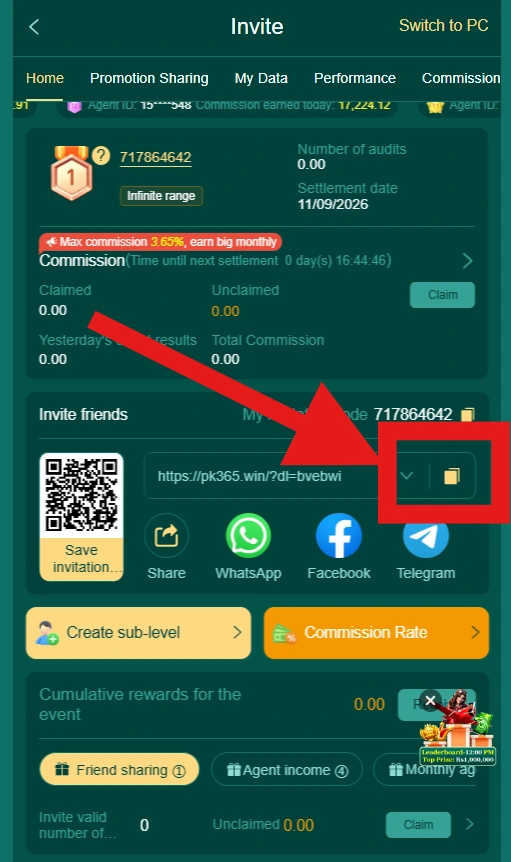
The referral link is the unique URL tied to your account (shown on the Invite > Home tab, with your identifying parameters). Anyone who registers through this link is connected to your account as a referral.
How to Copy Your PK365 Referral Link
- Open the Invite page from the bottom navigation bar.
- On the Home tab, locate the referral link field next to the QR code.
- Tap the copy icon beside the link.
- Share the copied link through your preferred channel.
PK365 Referral Code / QR Code
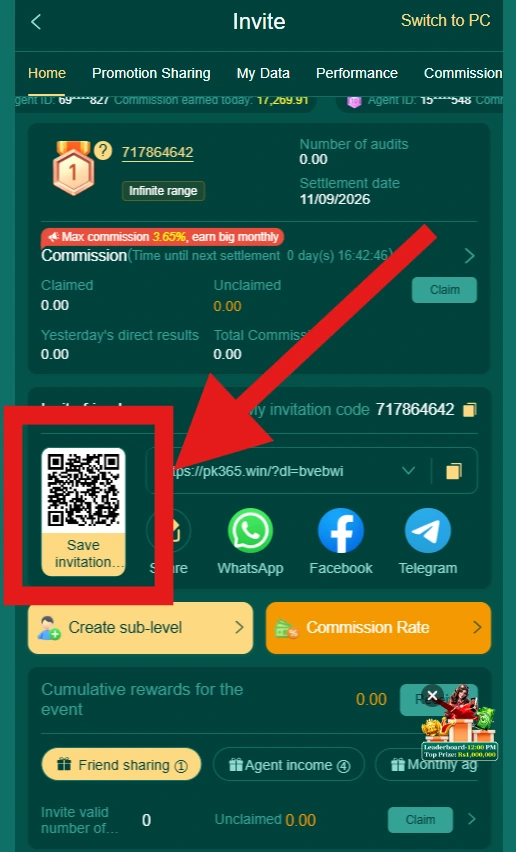
Instead of (or alongside) a text link, PK365’s Invite page displays a QR code with a “Save invitation…” option beneath it. This lets a new user scan the code directly instead of typing or clicking a link.
Where to Find It
The QR code appears directly above the share buttons on the Invite > Home tab.
How a New User Uses It
A new user can scan the QR code with their phone camera or a QR scanner app, which opens the referral link and starts the registration process linked to your account.
PK365 Refer and Earn
A refer-and-earn structure on PK365 is tied to commission, based on what’s visible in the Invite section (Agent ID, commission earned, commission rate, settlement cycle), rather than a single fixed one-time bonus. The exact commission percentage, qualifying activity, and payout conditions depend on the current terms shown under the Commission Rate section.
How Referral Earnings Work
- You share your referral link, QR code, or invite through the available share buttons.
- A new user registers through your link.
- The account is linked to your Agent ID.
- Any qualifying activity required by the program takes place.
- Commission is calculated and credited according to the settlement cycle (shown as Daily settlement).
PK365 Referral Bonus
The homepage does display promotional banners (for example, an app-download bonus and a jackpot prize pool), but these are separate from the Invite/referral commission structure. Don’t assume a referral automatically carries the same value as a homepage banner promotion, check the Commission Rate section inside Invite for the terms that actually apply to referrals.
PK365 Referral Reward Requirements
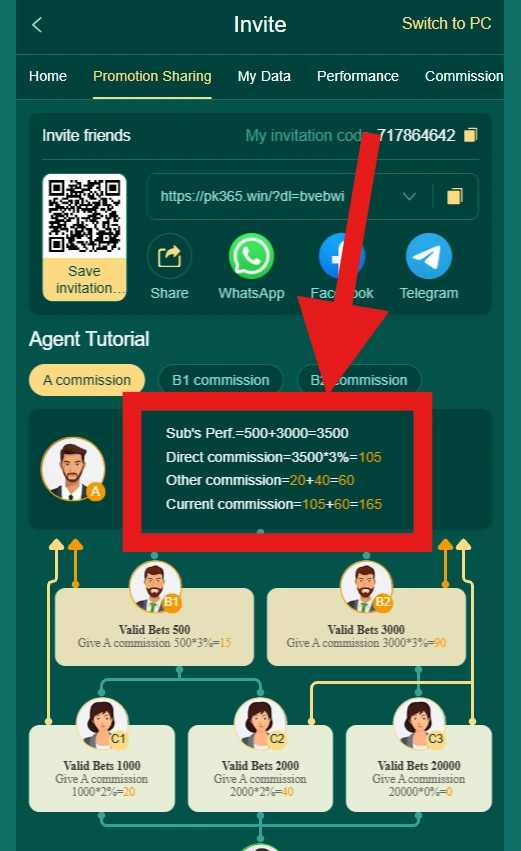
Based on the Invite page, the following elements are confirmed as part of the structure:
- A valid referral link, QR code, or Agent ID connection
- New-user registration through that link/code
- A settlement cycle (Daily settlement) before commission is finalized
- A commission rate, viewable in its own section
Who Is Eligible?
Any logged-in PK365 user with access to the Invite section can generate and share their referral link or QR code.
Who May Not Qualify?
Common restrictions on referral/commission programs (confirm against PK365’s current terms before relying on these):
- Existing accounts registering again under a new referral
- Duplicate accounts
- Self-referrals
- Invalid or incorrectly shared referral information
How to Invite Friends to PK365
Copy the Referral Link
Copy it from the Invite > Home tab, next to the QR code.
Share Through Built-In Options
The Invite page shows four direct share buttons: Share, WhatsApp, Facebook, and Telegram. Tapping one opens that channel with your referral link ready to send.
Share the QR Code
Use Save invitation… to save the QR code image, then send it directly to the person you’re inviting.
Confirm the Referral
Check the My Data or Performance tab on the Invite page to see whether a new referral has been recorded under your account.
PK365 Referral Statistics
The Invite page’s Home tab shows running figures such as:
- Commission earned today
- Number of audits
- Settlement cycle status
Additional detail is likely broken out further under the My Data and Performance tabs, though the specific fields there should be checked directly in the app.
PK365 Referral History
To review past referral and commission activity, check the Performance and Commission tabs on the Invite page. Typical information a program like this may show includes:
| Information | Purpose |
|---|---|
| Agent ID | Identifies your referral/commission account |
| Commission earned | Shows earnings credited over a period |
| Settlement cycle | Shows when earnings are finalized (Daily settlement) |
| Number of audits | Reflects account/referral verification activity |
Only rely on the fields actually shown when you open these tabs, since some data (like a full referral list) may sit deeper in the interface than the Home tab.
PK365 Referral Reward Not Received
Possible reasons:
- The settlement cycle hasn’t completed yet (commission is shown as Daily settlement, so timing matters)
- The invited user didn’t complete required registration or activity steps
- The referral link, code, or QR code wasn’t used correctly
- Account eligibility requirements weren’t met
- The reward is still being processed on the platform’s side
What to do:
- Check the Performance and Commission tabs for status.
- Review the Commission Rate section for current requirements.
- Confirm the invited user registered through your specific link or QR code.
- Keep a record of when the invite was sent and when registration occurred.
- Contact PK365’s official Support (available from the bottom navigation bar) if the issue isn’t resolved.
PK365 Referral Link Not Working
Link Does Not Open
- Check that the full URL was copied correctly.
- Try opening it in a different browser.
- Check your internet connection.
- Confirm you’re using the current official PK365 domain.
Referral Not Recorded
Check whether the invited user:
- Used the exact link or scanned the correct QR code
- Completed registration fully (rather than closing the process partway through)
- Created a genuinely new account rather than an existing one
PK365 Referral on Mobile
Since PK365’s interface shown here is a mobile-style layout, referral access works the same way on a phone:
- Open PK365 in your mobile browser.
- Log in to your account.
- Tap Invite in the bottom navigation bar.
- On the Home tab, find your referral link and QR code.
- Copy the link or save the QR code.
- Share it via Share, WhatsApp, Facebook, or Telegram.
Mobile Referral Tips
- Double-check the copied link before sending it.
- Use only the referral information currently shown in your own account.
- Never share your login credentials alongside your referral link.
- Avoid posting your Agent ID or account details in public places.
PK365 Referral and Account Security
- Sharing a referral link should never require you to reveal your password.
- Never share OTPs or login codes with anyone, even someone claiming to help with a referral.
- Don’t hand over your account credentials to another person under any circumstances.
- Be cautious of unsolicited messages claiming to guarantee referral rewards.
- Always check referral status through your own logged-in Invite page rather than trusting a third party’s claim.
Avoid Fake PK365 Referral Offers
- Fake bonus claims: Someone may advertise a referral reward that doesn’t match what’s shown in your own Commission Rate section, verify against the app itself.
- Fake referral links: Check that any link you’re about to use actually leads to PK365’s official domain before entering account details.
- Requests for passwords: A legitimate referral never requires sending your password to another person.
- Unofficial payment requests: Verify anything unusual through PK365’s official Support channel, not through the person who sent you a link.
PK365 Referral vs Commission/Affiliate Structure
| Referral (personal invite) | Agent/Commission Structure |
|---|---|
| Typically shared casually with friends | Tracked with an Agent ID and formal commission rate |
| Uses a personal referral link or QR code | Uses ongoing settlement cycles and audit tracking |
| Often a one-time invite action | Can involve recurring commission over time |
| Simple sign-up connection | Structured performance and commission reporting |
Based on the Invite page’s own tab names (Commission, Performance, My Data), PK365’s referral system leans toward an agent/commission model rather than a simple one-off referral bonus, treat it accordingly rather than assuming a flat reward per invite.
PK365 Referral Reward and Withdrawal
- Commission is tracked on a Daily settlement cycle, as shown on the Invite page.
- Whether a minimum threshold applies before commission becomes withdrawable, and whether it’s treated differently from other account balances, should be confirmed in the Commission Rate section or with official Support, this wasn’t specified in the visible interface.
- Check your main account balance or wallet section (outside of Invite) to see whether settled commission has been added there.
PK365 Referral Terms and Conditions
Before relying on any referral or commission activity, review PK365’s official terms for details on:
- Eligibility
- Referral/commission validity
- Reward or settlement conditions
- Duplicate account and self-referral restrictions
- Any expiration periods or reward limits
- How program changes are communicated
Where possible, link to PK365’s official terms page rather than reproducing lengthy terms secondhand.
Responsible Referral Practices
- Be transparent when sharing a referral link, let people know it’s a referral.
- Don’t spam your referral link across unrelated groups or channels.
- Don’t create duplicate accounts to try to generate extra commission.
- Don’t promise guaranteed earnings to anyone you invite.
- Follow the current terms shown in your own Commission Rate section.
PK365 Referral FAQs
PK365 Referral: Final Tips
The PK365 Invite page gives registered users access to their referral link, QR code, Agent ID, and commission tracking across the Home, Promotion Sharing, My Data, Performance, and Commission tabs. Before sharing an invitation, check the current Commission Rate section and settlement cycle rather than assuming a fixed reward. Treat referral commission as conditional, not guaranteed, and never share your password, login codes, or other private account details with anyone, including people you’re inviting or who claim to represent PK365.