
PK365 Game Withdraw
PK365 withdrawal is the process of requesting funds from a PK365 account through the withdrawal options available on the platform. The available payment methods, minimum and maximum amounts, verification requirements, fees, and processing times may change. This guide explains how the withdrawal process works, what to check before submitting a request, and what to do if a withdrawal is pending, rejected, or not received.
What Is PK365 Withdrawal?
A withdrawal is a request to move funds out of your PK365 account and into a payment method you’ve added to your account, such as JazzCash, EasyPaisa, bank transfer, or cryptocurrency.
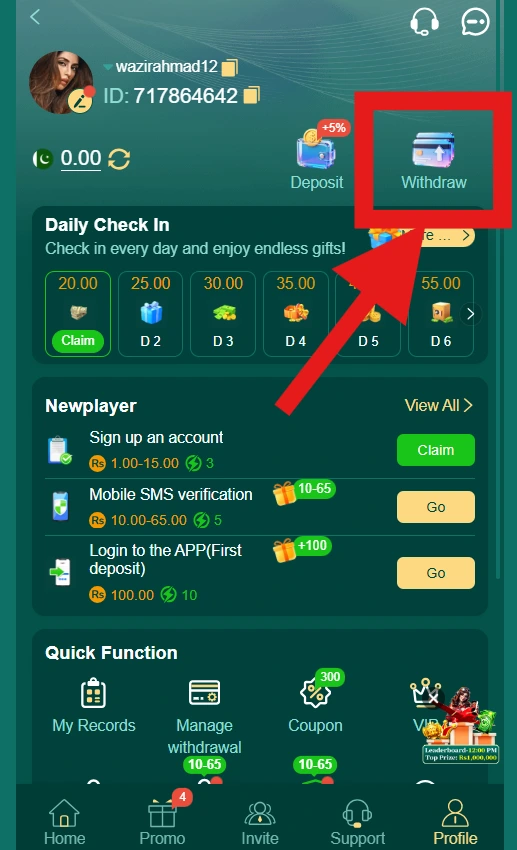
The Withdraw option is found on your account/profile page, alongside Deposit. To withdraw, you first add a receiving account (the destination for your funds), then submit a withdrawal request specifying the amount.
Before confirming a withdrawal, it’s important to review the request carefully, including the amount, the receiving account details, and the withdrawal method selected, since sending funds to an incorrect or unverified account can cause delays or loss of funds.
How to Access the PK365 Withdraw Page
Step 1 – Login to Your PK365 Account
Sign in to your account using your registered credentials.
Step 2 – Open Your Profile
Navigate to your profile page, where your balance, ID, and account options are displayed.
Step 3 – Select Withdraw
Tap the Withdraw option, shown next to Deposit near the top of the profile page.
Step 4 – Review Available Withdrawal Methods
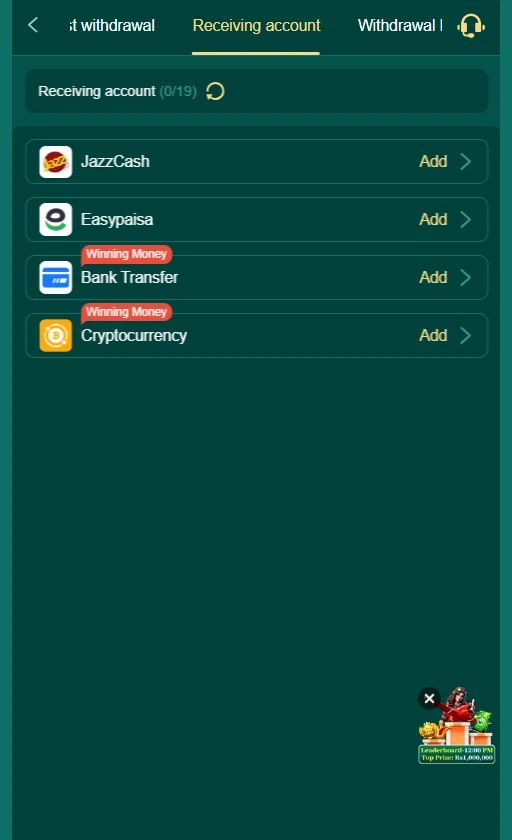
On the Withdraw screen, you’ll see tabs for Request withdrawal, Receiving account, and Withdrawal Records. Check the Receiving account tab to see which payment methods are currently available to add.
How to Withdraw Money From PK365
Step 1 – Login to PK365
Sign in using your registered account credentials.
Step 2 – Open the Withdraw Section
From your profile page, tap Withdraw.
Step 3 – Add a Receiving Account (if not already added)
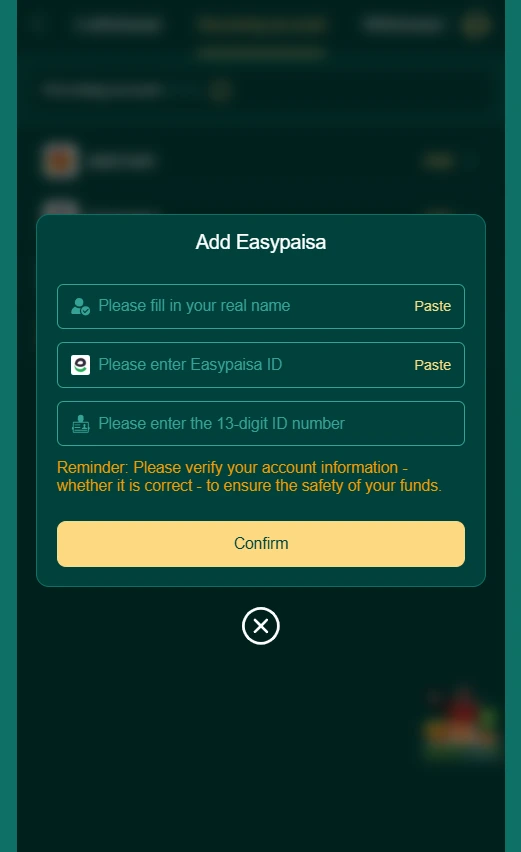
Before you can withdraw, you need to add a receiving account. Go to the Receiving account tab and choose a method, such as JazzCash, EasyPaisa, Bank Transfer, or Cryptocurrency, then tap Add. You’ll be asked to enter details relevant to that method (for example, adding EasyPaisa requires your real name, Easypaisa ID, and a 13-digit ID number). A reminder on this screen asks you to verify your account information is correct to help ensure the safety of your funds.
Step 4 – Set a Withdrawal Password (first-time only)
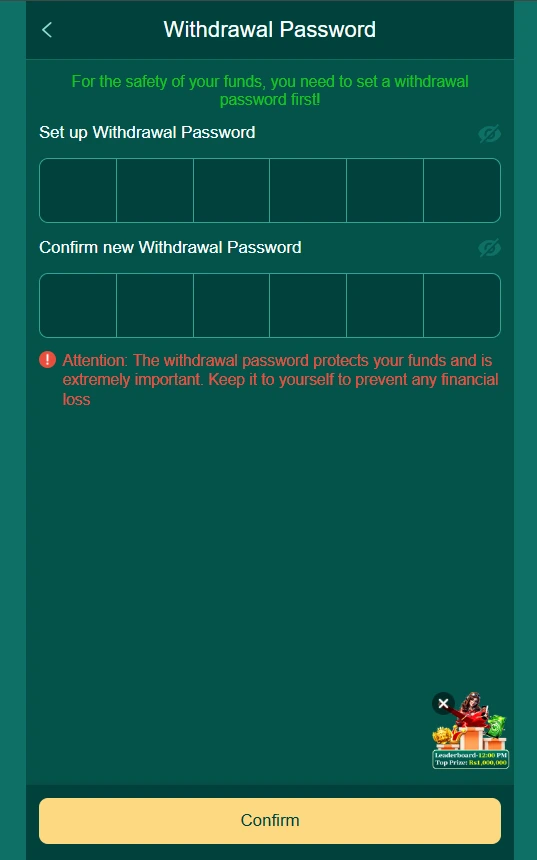
If this is your first withdrawal, you’ll be asked to set a dedicated Withdrawal Password before proceeding. This is separate from your login password and is specifically used to protect withdrawal requests. You’ll enter and confirm a 6-digit code. The platform notes that this password is extremely important for protecting your funds and should be kept private.
Step 5 – Choose a Withdrawal Type
On the Request withdrawal tab, select between Normal withdrawal and Convert to crypto, depending on how you want to receive your funds.
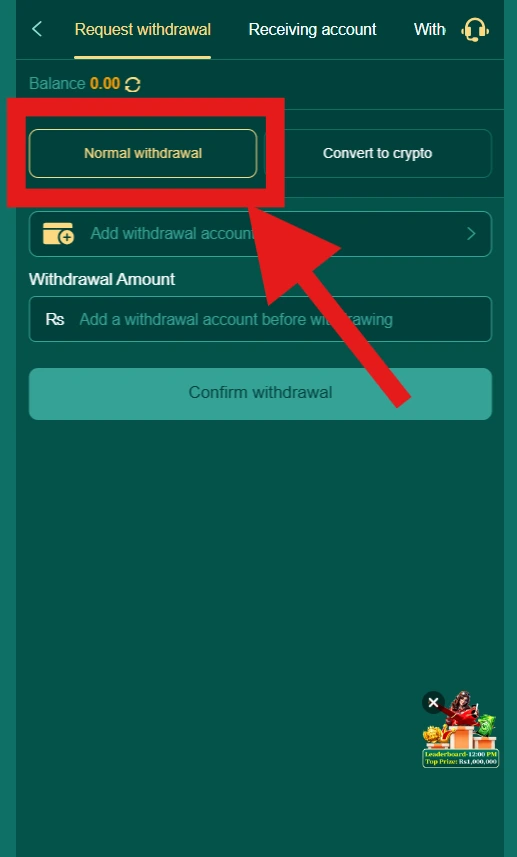
Step 6 – Select Your Receiving Account
Choose the withdrawal account you added earlier from the list.
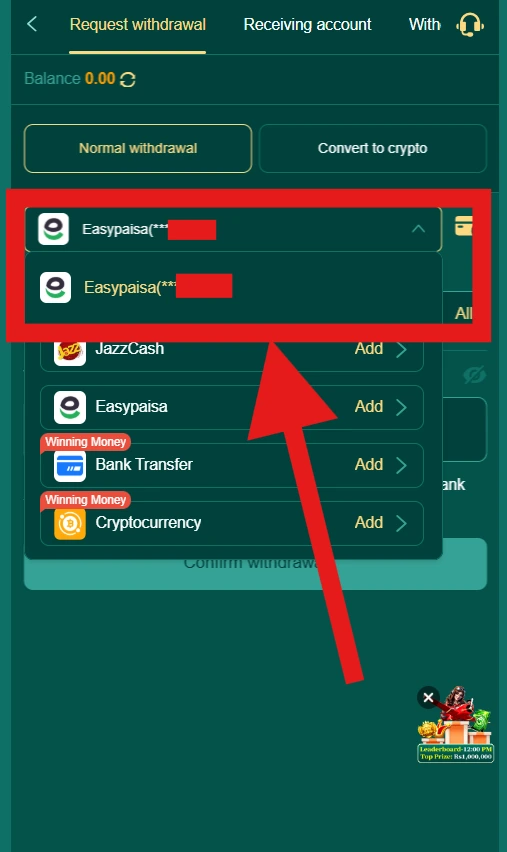
Step 7 – Enter the Withdrawal Amount
Enter the amount you want to withdraw in the “Withdrawal Amount” field.
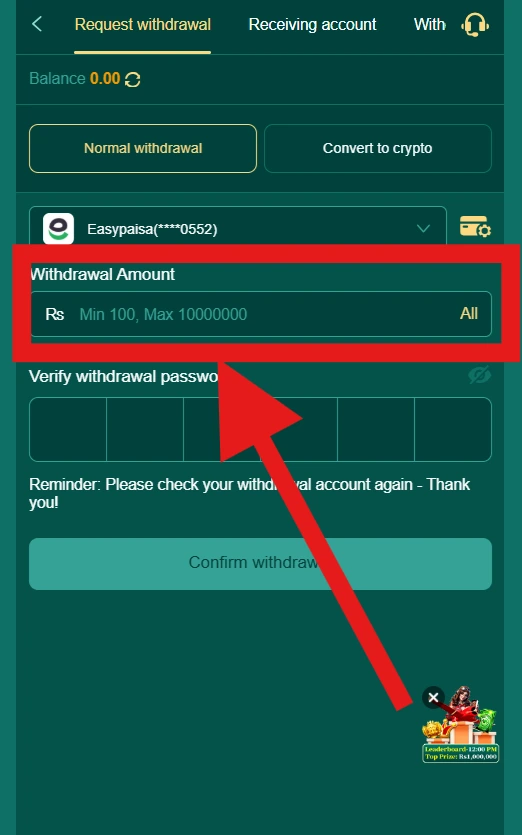
Step 8 – Review the Withdrawal Details
Before confirming, check:
- The withdrawal amount
- The selected withdrawal type (Normal or Convert to crypto)
- The receiving account details
- Your current balance, shown at the top of the screen
Step 9 – Submit the Withdrawal Request
Tap Confirm withdrawal to submit your request. You may be asked to enter your withdrawal password to authorize it.
Step 10 – Check the Withdrawal Status
Go to the Withdrawal Records tab to see your request and its current status.
PK365 Withdrawal Methods
Based on the Receiving Account screen, PK365 currently supports four withdrawal methods. Users add and manage these as “receiving accounts” before requesting a withdrawal.
JazzCash
Withdrawals can be sent to a linked JazzCash account. Users need to add their JazzCash account details under the Receiving Account section before it can be used for withdrawal.
Easypaisa
Withdrawals can also be sent to an Easypaisa account. When adding this method, the platform requests:
- Your real name (as registered on the account)
- Your Easypaisa ID
- A 13-digit ID number
The platform reminds users to verify that this information is correct before confirming, to help ensure the safety of their funds.
Bank Transfer
Bank Transfer is available as a receiving account option, marked with a “Winning Money” label on the interface. This label may indicate the method is specifically for withdrawing winnings, though this should be confirmed with the platform before publishing that distinction.
Cryptocurrency
Cryptocurrency is also available as a receiving account option, also marked “Winning Money.” This allows users to receive withdrawals via crypto instead of a local payment method.
PK365 Withdrawal Requirements
Before submitting a withdrawal request, users generally need:
- An active, registered PK365 account
- A successful login
- An available withdrawable balance
- A receiving account already added under the Receiving Account section (JazzCash, Easypaisa, Bank Transfer, or Cryptocurrency)
- Correct and verified recipient/payment information for the selected method
- A withdrawal password set up (required before your first withdrawal, separate from your login password)
- A stable internet connection
PK365 Withdrawal Amount
Minimum PK365 Withdrawal
Once a receiving account is selected (e.g., Easypaisa), the Withdrawal Amount field on the current interface shows a minimum of Rs 100.
Maximum PK365 Withdrawal
The same field shows a maximum of Rs 10,000,000 for the selected receiving account.
An “All” shortcut is also shown next to the amount field, which likely lets users withdraw their full available balance in one request.
Important: These limits are shown for the Easypaisa receiving account specifically on the current interface limits could vary by withdrawal method (Normal withdrawal vs. Convert to crypto) or by receiving account type (JazzCash, Bank Transfer, Cryptocurrency). I’d recommend noting on the published page that these are the figures shown for this method at this time, and that users should check the amount field for their specific selected account, since limits can differ or change.
PK365 Withdrawal Fees
Are There Withdrawal Fees?
PK365 does not charge a fee for withdrawals. The amount you request is the amount you’ll receive, with no deduction shown on the Request Withdrawal screen.
Good Practice
Even with no fee, it’s still worth:
- Double-checking the Withdrawal Amount before confirming
- Verifying your receiving account details are correct
- Keeping your transaction reference until the funds arrive
How to Check the Fee
Before confirming a withdrawal:
- Review the amount entered against any deduction shown on the confirmation screen
- Compare the requested amount with the amount that will actually be received, if both are displayed
- Check for differences between Normal withdrawal and Convert to crypto, as fees may differ between these options
PK365 Withdrawal Processing Time
Processing time can generally depend on several factors:
- The selected withdrawal method (JazzCash, Easypaisa, Bank Transfer, or Cryptocurrency)
- Whether the withdrawal type is Normal withdrawal or Convert to crypto
- Account or transaction verification
- Payment-provider processing on the receiving end
- The current status of the transaction
- Weekends or holidays, where applicable to certain payment providers
How Long Does a PK365 Withdrawal Take?
No specific timeframe is confirmed from the current interface, so this guide avoids promising a fixed processing time. Users can check the status of their request under Withdrawal Records to monitor progress.
How to Check PK365 Withdrawal Status
PK365 provides a dedicated Withdrawal Records section where users can track the status of their withdrawal requests.
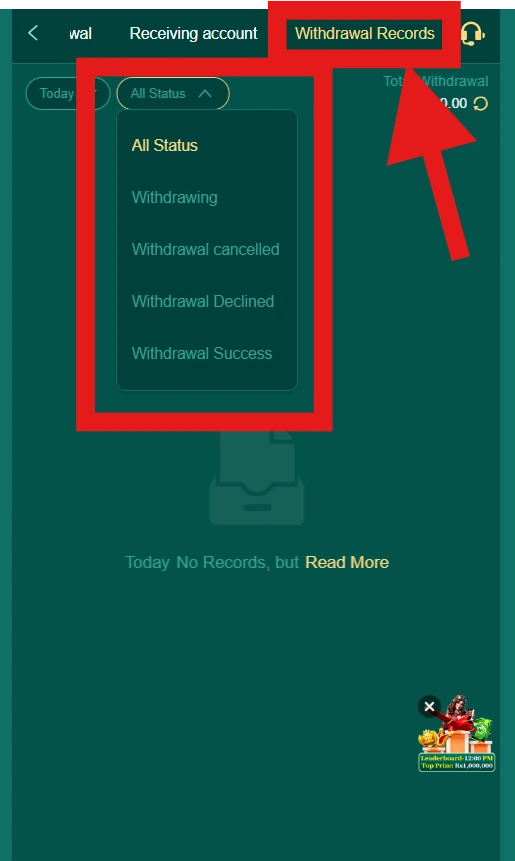
Check Your Withdrawal Records
- Go to the Withdraw section from your profile page.
- Select the Withdrawal Records tab.
- Use the All Status filter to view your requests by status, or leave it on “All Status” to see everything.
Confirmed Status Categories
Based on the current interface, the status filter shows the following options:
- All Status
- Withdrawing
- Withdrawal cancelled
- Withdrawal Declined
- Withdrawal Success
You can also filter records by date (e.g., “Today”) using the date selector on this screen.
What You Can See in Your Records
The Withdrawal Records section also displays your Total Withdrawal amount, along with a refresh option to update the figures shown.
PK365 Withdrawal Pending (Withdrawing)
On PK365, a withdrawal request that’s still being processed appears under the Withdrawing status in your Withdrawal Records.
If your withdrawal shows as Withdrawing:
- Check the status in your Withdrawal Records under the Withdraw section.
- Confirm the amount requested matches what you intended to withdraw.
- Review the selected receiving account to make sure the correct payment method and details were used.
- Don’t repeatedly submit the same withdrawal request while one is still showing as Withdrawing.
- Keep your transaction reference, if one is shown, for your records.
- Check with your payment provider (JazzCash, Easypaisa, your bank, or crypto wallet) to see if anything has arrived or is pending on their end.
- Contact official PK365 support if the request remains in the Withdrawing status for an unusual length of time.
Note: No specific timeframe is confirmed for how long a request typically stays in “Withdrawing” status, so this section avoids promising a fixed resolution time.
PK365 Withdrawal Declined
Based on PK365’s actual status terminology, a withdrawal request that doesn’t go through appears as Withdrawal Declined in your Withdrawal Records (rather than a generic “failed” status).
Possible Reasons a Withdrawal May Be Declined
- Incorrect or unverified receiving account information
- Unsupported or restricted withdrawal method
- Insufficient withdrawable balance
- Withdrawal password entered incorrectly
- Withdrawal limit exceeded
- Payment-provider issue on the receiving end
- Account restriction
- Temporary technical issue
What to Do If Your Withdrawal Is Declined
- Check your Withdrawal Records for any explanation shown alongside the declined status
- Review your receiving account details for accuracy
- Confirm your available balance and that the amount requested was valid
- Correct any incorrect information before submitting a new request
- Contact official PK365 support if the reason isn’t clear or the issue continues
PK365 Withdrawal Rejected
Since PK365’s interface uses Withdrawal Declined as its actual status label, this section is best treated as the same status covered above rather than a separate “Rejected” state. If you’re using this outline to build the page, I’d recommend merging this section with “PK365 Withdrawal Declined” to avoid describing two statuses that don’t both exist on the platform.
Withdrawal Shows Success but Money Has Not Arrived
If your Withdrawal Records show a Withdrawal Success status but you haven’t received the funds:
- Check the transaction status again in your Withdrawal Records to confirm it still shows as successful.
- Verify your receiving account details, confirm the JazzCash, Easypaisa, bank, or crypto address on file is correct and active.
- Check with your payment provider to see if the funds have arrived or are still processing on their end, since a “Success” status on PK365 reflects PK365 releasing the funds, not necessarily their arrival in your account.
- Keep your transaction reference for any follow-up with support.
- Contact official PK365 support if the funds still haven’t appeared after a reasonable amount of time, providing your transaction details.
Important: Don’t submit another withdrawal request immediately if funds haven’t arrived, confirm with your payment provider and PK365 support first, since a duplicate request could cause further confusion.
PK365 Withdrawal Cancelled
Based on the Withdrawal Records filter, PK365 uses Withdrawal cancelled as a distinct status from “Declined.”
What a Cancelled Withdrawal Means
A cancelled withdrawal generally means the request was stopped before being completed, this could happen either through user action or a platform-side cancellation, depending on the circumstances.
Where to Check
You can view cancelled requests by selecting the Withdrawal cancelled filter under the status options in your Withdrawal Records.
What to Do If Your Withdrawal Was Cancelled
- Check your balance to confirm whether the funds were returned to your account
- Review your receiving account details in case the cancellation was related to incorrect or unverified information
- Submit a new withdrawal request once any issue has been corrected
- Contact official PK365 support if you’re unsure why a request was cancelled or if your balance wasn’t restored
PK365 Withdrawal Transaction ID
Keeping a record of your withdrawal details can help resolve issues quickly if something goes wrong. Useful information to save includes:
- Transaction ID or reference number, if shown in your Withdrawal Records
- Withdrawal amount
- Date and time of the request
- Withdrawal method used (JazzCash, Easypaisa, Bank Transfer, or Cryptocurrency)
- Transaction status (Withdrawing, Withdrawal cancelled, Withdrawal Declined, or Withdrawal Success)
Where to Find This Information
This information is available under the Withdrawal Records tab in the Withdraw section of your account, where you can filter by status and date to locate a specific request.
Security Warning
Avoid publicly posting screenshots of your withdrawal records, receiving account details, or transaction confirmations on social media or public forums. These can contain sensitive information, such as your account ID, name, or payment details, that could be misused if seen by others.
PK365 Withdrawal Security Tips
- Use the legitimate PK365 website, always access your account through the official site or app.
- Check the website address before logging in or making a withdrawal request.
- Review your receiving account details carefully before confirming, the platform itself reminds users to verify this information to protect their funds.
- Never share your login password.
- Never share your withdrawal password. This code is specifically meant to protect your funds and should be kept private, as the platform itself warns.
- Never share an OTP or verification code with anyone.
- Don’t give account credentials to anyone claiming to offer withdrawal help or “assistance,” even if they claim to represent PK365.
- Avoid suspicious payment links sent through unofficial channels.
- Keep your transaction and withdrawal records for your own reference.
- Log out when using a shared or public device, especially after adding or managing receiving accounts.
How to Avoid Fake PK365 Withdrawal Services
Withdrawals involve real money leaving your account, which makes this a common target for scams. Be cautious of third parties claiming they can help process or speed up your withdrawal.
Don’t Trust Random Social Media Accounts
Avoid sending your account information, receiving account details, or withdrawal password to anyone contacting you through social media, private messages, or comments, even if they claim to be affiliated with PK365.
Verify Payment Details Through the Official Platform
Only enter or update your receiving account information directly through the official PK365 Receiving Account section. Don’t follow payment instructions received from unofficial sources.
Don’t Pay Unofficial “Release” Fees
If someone contacts you privately and asks for a payment to “release,” “unlock,” or “process” your withdrawal, treat this as a strong warning sign. Legitimate withdrawals are processed through the platform itself and don’t require a private payment to a third party. Verify any such claim through official PK365 customer support before taking action.
Don’t Share Login or Withdrawal Credentials
No legitimate support channel, and no information website like this one, should ever ask for your password, withdrawal password, or verification codes.
PK365 Withdrawal on Mobile
How to Withdraw From PK365 on Mobile
- Open the PK365 website or app on your mobile device.
- Log in to your account.
- Go to your profile page and tap Withdraw.
- If you haven’t already, add a receiving account under the Receiving account tab (JazzCash, Easypaisa, Bank Transfer, or Cryptocurrency).
- Set up your withdrawal password if this is your first withdrawal.
- On the Request withdrawal tab, choose Normal withdrawal or Convert to crypto.
- Select your receiving account and enter the withdrawal amount.
- Review the details and tap Confirm withdrawal.
- Check your Withdrawal Records to monitor the status of your request.
PK365 Withdrawal vs Deposit
| Feature | Deposit | Withdrawal |
|---|---|---|
| Purpose | Add funds to an account | Request funds out of an account |
| Direction | Into account | Out of account |
| Main action | Deposit | Withdraw |
| Payment details | Funding method (Online deposit or Cryptocurrency) | Receiving account (JazzCash, Easypaisa, Bank Transfer, or Cryptocurrency) |
| Extra security step | Not required | Withdrawal password required on first use |
| Status | Reflected via balance/transaction history | Withdrawing, Withdrawal cancelled, Withdrawal Declined, or Withdrawal Success |
| Transaction record | Available via Deposit transaction history | Available via Withdrawal Records |
For deposit instructions, see the PK365 Deposit Guide.
PK365 Withdrawal Problems and Solutions
| Problem | What to Check |
|---|---|
| Withdrawal stuck on “Withdrawing” | Check Withdrawal Records for status updates; avoid resubmitting; contact support if unusually delayed |
| Withdrawal Declined | Review receiving account details, balance, and withdrawal password; correct and retry |
| Withdrawal cancelled | Check whether funds were returned to your balance; verify receiving account details |
| Withdrawal Success but money not received | Check with your payment provider; verify receiving account details; contact PK365 support with transaction reference |
| Wrong receiving account details entered | Check whether the request can still be cancelled or corrected; contact support if already submitted |
| Withdraw option unavailable | Check account status, balance, and whether a receiving account has been added |
| Forgot withdrawal password | Look for a recovery option on the Withdrawal Password screen, or contact official support |
| Technical error on Withdraw page | Refresh the page, check your connection, or try again later |
PK365 Customer Support for Withdrawal Issues
Contact official PK365 support when:
- A withdrawal shows as Withdrawal Success but the funds haven’t arrived
- Your balance was deducted but the withdrawal doesn’t appear in your records
- A withdrawal has been stuck in Withdrawing status for an unusual length of time
- A withdrawal was Declined without a clear reason
- A withdrawal was cancelled and you’re unsure why, or the funds weren’t returned to your balance
- Your receiving account information needs correction
- You’ve forgotten your withdrawal password
- You notice an unfamiliar withdrawal request on your account
Information to Prepare
Before contacting support, have the following ready:
- Transaction ID or reference number, if available
- Withdrawal amount
- Date and time of the request
- Withdrawal method used (JazzCash, Easypaisa, Bank Transfer, or Cryptocurrency)
- Current status shown in your Withdrawal Records
How to Reach Support
Use the Customer Service option available on the platform, shown as a headset icon on the Withdraw and profile screens.

Important: Never send your login password or withdrawal password to anyone, including someone claiming to be PK365 support. Legitimate support will never need these to resolve a withdrawal issue.
PK365 Withdrawal Security and Privacy
Protect Your Account
Use a strong, unique login password, and never share it with anyone. This is the first line of defense for your account and everything connected to it, including your withdrawal settings.
Protect Your Withdrawal Password
Your withdrawal password is a separate 6-digit code specifically required to authorize withdrawal requests. As the platform itself warns, this password protects your funds and should be kept strictly private, anyone with access to it could potentially authorize withdrawals from your account.
Protect Your Payment Information
Only enter your receiving account details (JazzCash, Easypaisa, Bank Transfer, or Cryptocurrency information) directly into the official PK365 Receiving Account section. Don’t share this information with anyone else, and always double-check it’s correct before confirming, since the platform notes this helps ensure the safety of your funds.
Protect Your Transaction Records
Store your withdrawal receipts and transaction references securely, and avoid publishing screenshots of your records, including your account ID, name, or payment details, on social media or public forums.
Responsible Gaming and Withdrawals
- Only use money you can afford to lose. Avoid relying on withdrawal amounts to cover essential expenses.
- Don’t chase losses by making additional deposits in hopes of a bigger withdrawal later.
- Set personal spending limits and try to stick to them, regardless of recent wins or losses.
- Take breaks from gaming regularly rather than treating withdrawals as a reason to continue playing.
- Monitor your spending and withdrawal patterns over time to stay aware of your overall activity.
- Stop and reassess if gaming is starting to affect your finances or daily life.
- Use responsible-gaming controls, if the platform offers them, to help manage your activity.
If you ever feel that gaming is becoming difficult to control, consider reaching out to a support organization or helpline in your region for confidential assistance.
PK365 Withdrawal FAQs
PK365 Withdrawal: Final Tips
Before submitting a PK365 withdrawal request, check the available withdrawal method, amount, receiving account information, fees, and any requirements shown on the current platform. Keep your transaction reference until the funds have been received. If a withdrawal becomes stuck, is declined, or does not arrive, check the status in your Withdrawal Records first and use the platform’s official support channel when necessary.