
Aviator: Complete Guide
Aviator is a crash-style multiplier game (originally developed by Spribe) available on the PK365 platform. Instead of spinning reels, you’re watching a plane climb and racing to cash out before it flies away.
1. What Is Aviator?
Aviator is a real-time, round-based betting game built around a single rising number: the multiplier. Each round, a plane takes off and the multiplier climbs from 1.00x upward. At any random point, the plane “flies away” (crashes) and the round ends. If you cash out before that happens, you win your stake multiplied by whatever the multiplier was at the moment you cashed out. If the plane crashes before you cash out, your stake is lost.
There’s no skill in predicting when the crash will happen, it’s generated randomly each round, so the entire game comes down to risk management and timing discipline.
2. The PK365 Aviator Screen, Explained
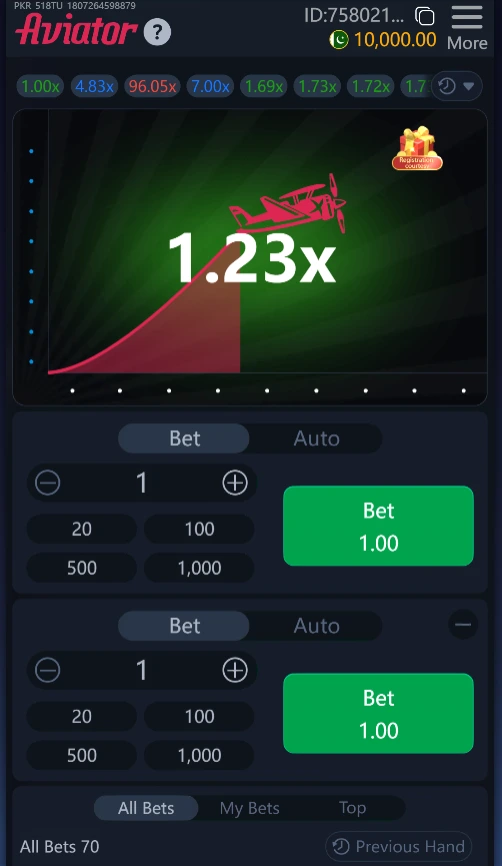
Based on the app interface:
- Top bar : shows your round ID, a copy-ID icon, your account balance (e.g. “10,000.00”).
- Multiplier history strip — the row of colored numbers (e.g. 1.00x, 4.83x, 96.05x, 7.00x) just under the top bar. Each one is the crash point of a previous round. Green/blue tend to mark smaller multipliers, red/purple mark bigger ones. Tap the small arrow to expand the full round history.
- Main flight display — the graph in the center showing the plane’s climb and the live multiplier in large text (e.g. “1.23x”). This resets every round.
- Dot trail on the left edge — a visual round-progress indicator.
- Two independent Bet panels — PK365 lets you place two separate bets in the same round, each with its own stake and its own cash-out. This lets you, for example, cash out one bet early for a safe small win while letting the second ride for a bigger multiplier.
- Bet / Auto toggle — switch each panel between manual betting and Auto Bet mode (auto-places your bet every round), the second panel in the screenshots is set to Auto.
- Stake stepper (−/+) and quick-stake buttons (20 / 100 / 500 / 1,000), fast ways to set your bet size without typing.
- Green Bet button — shows your current stake (e.g. “Bet 1.00”) and becomes Cash Out with a live multiplier once the round starts and your bet is active.
- All Bets / My Bets / Top tabs — a live feed of every player’s bets and cash-outs on the table (“All Bets 75” = total bets placed this round), your own personal bet history, and the top winners.
- Previous Hand — jumps back to see the result and payouts from the last completed round.
The “More” Menu
Tapping More opens a panel with:
- Account/ID shortcut
- SFX and Sound toggles — turn game sound effects and background audio on/off
- Animation toggle — turn the plane/graph animation on or off (useful for low-end devices or faster play)
- Bet Records — your full wagering history
- Line — likely a customer-support/agent line or connection indicator
- Rules — the official rulebook and payout mechanics for this version of Aviator
- Limits — minimum/maximum bet and cash-out limits for the table
- Hide — collapses the menu; the version number (e.g. v7.2.7) is shown here too
3. How to Play a Round, Step by Step
- Set your stake using the +/- stepper or a quick-bet button (20, 100, 500, 1,000) in either Bet panel.
- Place your bet by pressing the green Bet button before the round starts (there’s a short countdown/betting window between rounds).
- Watch the plane take off. The multiplier starts at 1.00x and climbs.
- Press Cash Out (the button changes from “Bet” to a live multiplier once your bet is in) whenever you want to lock in your win.
- If you cash out before the crash, your stake × the multiplier at that moment is credited to your balance.
- If the plane crashes before you cash out, that stake is lost, the round ends and a new one begins.
- Because PK365 supports two simultaneous bets, you can repeat steps 1–2 on the second panel with a different stake and/or use Auto Cash Out to have it cash out automatically at a multiplier you set in advance.
4. Tips and Tricks for New Users
Start small and just watch
Before betting real money, place the minimum stake for several rounds (or use a demo balance if PK365 offers one) purely to get a feel for how fast the multiplier moves and how often it crashes early versus late.
Use the two-bet panels strategically
A common approach: put a smaller stake on Bet 1 with an early auto cash-out (e.g. 1.5x–2x) to bank a small, reliable win almost every round, and let Bet 2 ride further for a bigger multiplier. This way one bet is protecting the other.
Set an auto cash-out and respect it
If PK365’s Auto mode lets you pre-set a cash-out multiplier, use it. Manually watching the graph and trying to time your click at the “perfect” moment is where most new players lose money to hesitation or lag.
Treat multiplier history as entertainment, not a signal
The colored history strip at the top shows past rounds, but each round is fully independent, a string of low multipliers does not make a high one “due,” and vice versa. Aviator (like all crash games) uses a random, provably-fair result generator each round.
Decide your cash-out target before the round starts
Pick a target multiplier (e.g. 1.5x, 2x, 3x) based on your risk tolerance and commit to it before the plane takes off. Chasing higher multipliers mid-round after you already planned to cash out is the fastest way to turn a win into a loss.
Use the quick-stake buttons to stay disciplined
Rather than typing custom amounts, sticking to the preset stake buttons (20/100/500/1,000) makes it easier to keep your bets consistent and avoid impulsively increasing your stake after a loss (“chasing losses”).
Turn off animations if you’re reacting to timing
If your strategy depends on reacting quickly to the live multiplier, disabling Animation in the More menu can make the number update feel more immediate on slower devices/connections.
Check Limits and Rules first
Before playing, open Limits to confirm min/max bet and max cash-out for the table, and Rules to understand exactly how PK365’s version of Aviator calculates payouts and handles disconnects, this varies slightly by platform.
Keep a simple record
Use the Bet Records and My Bets tabs to review your own results periodically. Tracking your actual win rate over many rounds gives a much clearer picture than remembering only your best or worst hands.
Set a session budget and a stop-loss
Decide, before you start, the maximum amount you’re willing to lose in a session, and the point at which you’ll stop even if you’re winning. Crash games are fast-paced and it’s easy to lose track of both time and total spend.
5. A Note on Play
Aviator’s outcome each round comes from a random, provably-fair result, no pattern in the multiplier history, no betting system, and no reaction speed can change the underlying odds. Play only with money you can afford to lose, use the platform’s limits and auto cash-out tools to stay disciplined, and take breaks between sessions.