
Download PK365 APK: Latest Version For Android
Download PK365 APK for Android from the official website. Quick, safe install in minutes with low data use. Follow the simple steps here.

Detail | Info |
|---|---|
App Name | PK365 Game |
Latest Version | V1.1.74 |
File Format | APK |
Platform | Android |
File Size | 7MB (Speed App) and 45.5MB |
Is this the official PK365 APK?
This page links to the PK365 APK as provided by its developer, without modification. Always download APK files from a source you trust, because files shared through WhatsApp groups, Telegram channels, and unofficial mirrors can be modified, may not work properly, and can put your account or device at risk.
How can you check an APK before installing it?
- Check the file size and version number against the official listing.
- Scan the file with a trusted antivirus or an online scanner such as VirusTotal.
- Review the permissions the app asks for during installation and decline anything unrelated to its function.
- Keep Play Protect enabled, and install only from sources you trust.
How to Download PK365 APK on Android
Step 1: Click the Download PK365 APK Button
Click the Download PK365 APK button above. It will take you straight to the official download page, so there’s no need to search for links or use unknown mirrors. Starting from the official page is the safest way to begin your PK365 app download.
Step 2: Confirm You are on the Official Download Page
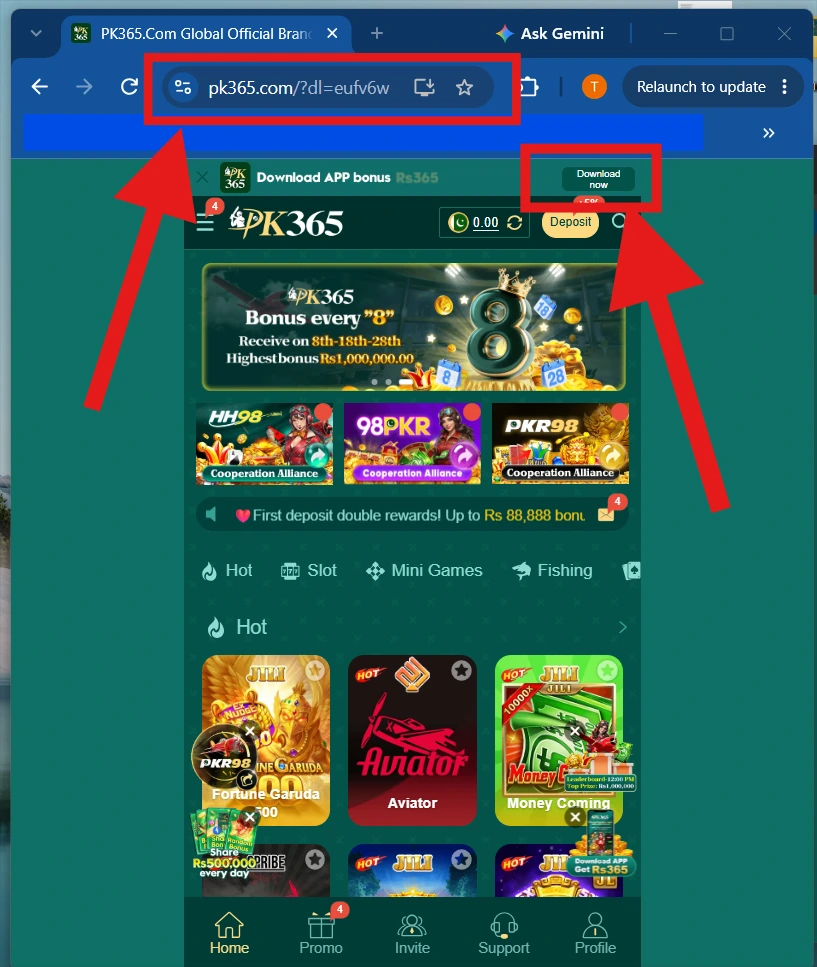
Once the page loads, check that you have reached the official PK365 website. Verify the web address, page name, and branding before downloading the APK, as shown in the screenshot below.
Step 3: Check Device Compatibility
Before you continue, make sure your phone meets the current PK365 requirements. Check that you are using a supported Android version, have enough free storage for the APK and installation, and have a stable internet connection. Meeting these basic requirements can help reduce download and installation problems.
Step 4: Tap the Download Option
On the official page, select the Download Now. Choosing the right version helps the app run properly. Your browser may show a file-type notice for APK files, so read it carefully before you continue.
Step 5: Wait for the PK365 Download to Complete
Let the file finish downloading without interrupting it. Check your browser’s downloads area or your phone’s file manager to confirm the PK365 APK file is fully downloaded. Don’t close the page early.
Step 6: Verify the File Before Installing
Before you install, check that the file name, size, and source match what the page lists. If something looks different, delete the file and download it again from the official page. Verifying first keeps your PK365 app installation safe and secure.
How to Install PK365 APK on Android
Step 1 – Download the APK
Get the file from the official site only.
Step 2 – Open the Downloaded File
Locate the APK in your device’s download folder.
Step 3 – Review Android Security Settings
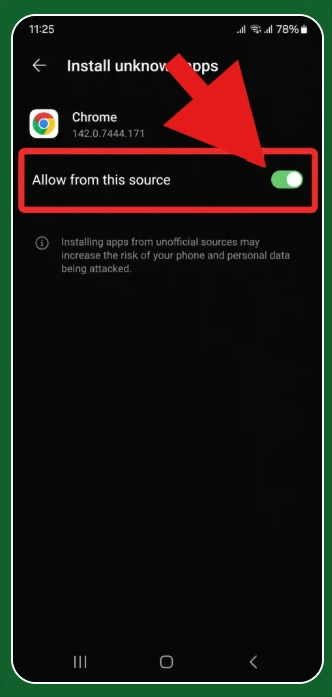
Modern Android versions may restrict installation from unknown sources by default. This is a built-in safety feature, think carefully before overriding it, and only do so if you’re confident the file is genuinely official.
Step 4 – Install the Application
Follow the on-screen Android installation prompts.
Step 5 – Open the APP
Launch the app once installation finishes.
Step 6 – Register or Login
Use the appropriate account option to continue.
PK365 Download Requirements and Safety Check
Before downloading or installing the PK365 APK, check the following requirements and safety points:
Download and Installation Requirements
- Compatible Android device
- Supported Android version
- Adequate storage space for the APK and installation
- Stable internet connection
- Updated Android system and web browser
- The correct application file, if an APK is currently available
APK Safety Checks
- Download the file from a source you trust.
- Check that the APK version and file size match the available information.
- Avoid files advertised as modified, cracked, hacked, or unlocked.
- Review the permissions requested by the app before installation.
- Keep Android security protections enabled.
- Scan an unfamiliar APK with a reputable security tool before installing it.
- Avoid APK files obtained from suspicious mirrors or unknown download pages.
PK365 App Features
- Account login
- Registration
- Game access
- Account management
- Deposit
- Withdrawal
- Bonus/promotion area
- Referral section
- Customer support
PK365 APK Download and Installation Steps
A quick overview of the full process:
Check device compatibility
↓
Find the verified download option
↓
Download the application
↓
Verify the source/file
↓
Install the application
↓
Open PK365
↓
Login or register
Common PK365 APK Download Problems and Solutions
Download Button Does Nothing
- Refresh the page.
- Check your internet connection.
- Try another compatible browser.
- Confirm the download is still available.
Download Stops
Check:
- Your internet connection
- Available device storage
- Browser download restrictions
- Server availability
Downloaded File Is Incomplete
Delete the incomplete file and download it again from the verified source.
PK365 APK Not Installing
Possible reasons include:
- Incompatible Android version
- A corrupted APK file
- Insufficient storage
- Installation restrictions on the device
- A conflicting existing version
- An unsupported device
Recommended troubleshooting:
- Check your Android version.
- Check available storage.
- Verify the APK source is legitimate.
- Download the file again if necessary.
- Check Android’s security prompts carefully.
- Remove an older version only if appropriate.
- Contact official support if the issue persists.
PK365 App Not Opening
Common causes:
- An outdated app version
- An unsupported device
- A corrupted installation
- An internet connection issue
- A temporary service problem
Basic troubleshooting:
- Restart the application.
- Restart the device.
- Check your internet connection.
- Update the application if an official update is available.
- Reinstall only from a verified source.
PK365 App Update
How to Check the PK365 App Version
Version information is typically available within the app’s settings or account area, or on the official download listing.
How to Update PK365
Use the official update method, through an app store if the app was installed that way, or by downloading the latest verified file if updates are distributed directly.
Why Update PK365?
Updates can bring:
- Bug fixes
- Better compatibility
- Security improvements
- New features
- Performance improvements
Safe Download and Installation Practices for PK365 Users
- Download applications only from verified sources.
- Be cautious with APK files hosted on unfamiliar websites.
- Check the website address carefully before downloading anything.
- Keep Android or Windows security protections enabled.
- Don’t install modified or “hack” versions of the app.
- Avoid files that request permissions unrelated to their purpose.
- Scan suspicious files with appropriate security software before opening them.
- Keep your operating system updated.
Avoid Fake PK365 APK Downloads
Searches for APK files can sometimes lead to unofficial and potentially harmful sources. Watch for these warning signs:
- “Unlimited money” APK Avoid modified applications that claim unlimited balance or guaranteed rewards, these are a common red flag.
- “PK365 Hack” APK Don’t download modified or pirated versions of any app.
- Fake login applications A malicious application may be designed to capture your account credentials rather than provide real access.
- Unknown download websites Don’t assume a site is legitimate just because it uses the PK365 name, check the domain carefully.
- Excessive permissions Be cautious of any application requesting permissions that don’t relate to its stated purpose.
PK365 APK Download vs Browser Access
| Feature | App | Browser |
|---|---|---|
| Installation | Required if native app/APK | Not normally required |
| Storage | Uses device storage | Minimal |
| Updates | App updates may be required | Website updates automatically |
| Access | App icon | Browser |
| Compatibility | Depends on app support | Depends on browser/site support |
PK365 Customer Support
Consider reaching out to official support for issues such as:
- A download link that isn’t working
- An app that won’t install
- An account that can’t be accessed after installation
- An official update causing a problem
- Any unexpected error
Use only the official PK365 support channel, this guide doesn’t publish unverified WhatsApp, Telegram, email, or phone contact details, and you shouldn’t trust such details from unofficial sources either.
PK365 APK Download Safety Checklist
- Check the website address
- Confirm app/device compatibility
- Download from a verified source
- Check the file before installation
- Keep device security enabled
- Avoid modified APKs
- Don’t share account credentials
- Keep the app updated
- Delete suspicious installation files
Final Tips
Before downloading PK365, check which access method is currently supported for your device and use a verified source. Avoid modified APKs and unknown download websites, and keep your device’s security features enabled. After installation, use the normal PK365 login process to access your account. If the application or download does not work, check compatibility and the current official support information before trying an unofficial solution.